
VERSION 10 answers the questions MSPs are asking about AI in compliance: How do I control it? Can I explain it to an auditor? What if I'm not ready for AI yet?
The Question Every MSP Will Eventually Face
Cyber insurers, auditors, and customers are starting to ask a question most MSPs can't answer yet:
"How is AI being governed in your compliance workflows?"
It's a fair question. If you're using AI to help with assessments, policies, or risk analysis, someone is eventually going to ask how it works, what data it uses, and why you trust its output.
VERSION 10 was built to give you a defensible answer.
What MSPs Are Asking About AI in Compliance
We've heard the same questions from MSPs evaluating AI tools for GRC:
- "Can I see what the AI is actually doing?"
- "What happens if I need to explain this to an auditor?"
- "What if my client doesn't want AI touching their data?"
- "How do I know the AI understands my specific client's requirements?"
VERSION 10 addresses each of these directly.
"Can I See What the AI Is Actually Doing?"
Most AI tools hide their prompts and logic. You get an output, but you can't see how it got there.
VERSION 10 exposes the entire governance layer. Every AI prompt is visible, editable, and version-controlled.
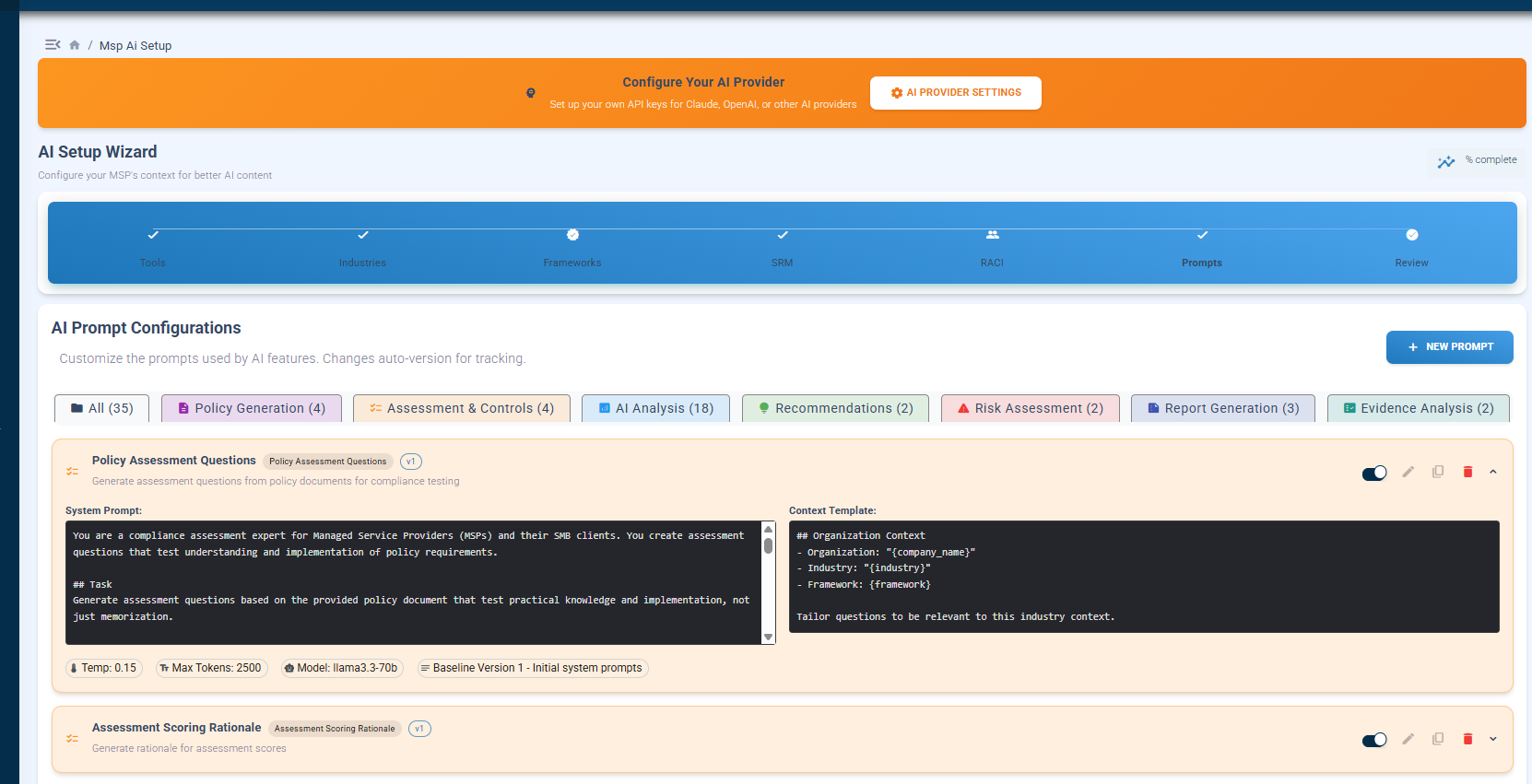
What you're seeing: The AI Setup Wizard shows all 13+ prompts organized by category: Policy Generation, Assessment & Controls, AI Analysis, Recommendations, Risk Assessment, Report Generation, and Evidence Analysis. Each prompt shows the system instructions, context template, temperature settings, and model selection. You can edit any prompt and changes are automatically versioned.
Why this matters: When someone asks "how did the AI reach that conclusion?" you can show them exactly what instructions it was given and what context it had access to. No black boxes.
"What Happens If I Need to Explain This to an Auditor?"
Auditors don't care that you used AI. They care whether your compliance decisions are explainable, defensible, and repeatable.
VERSION 10 generates AI-powered reports that include the context used to produce them so you can demonstrate the reasoning, not just the result.
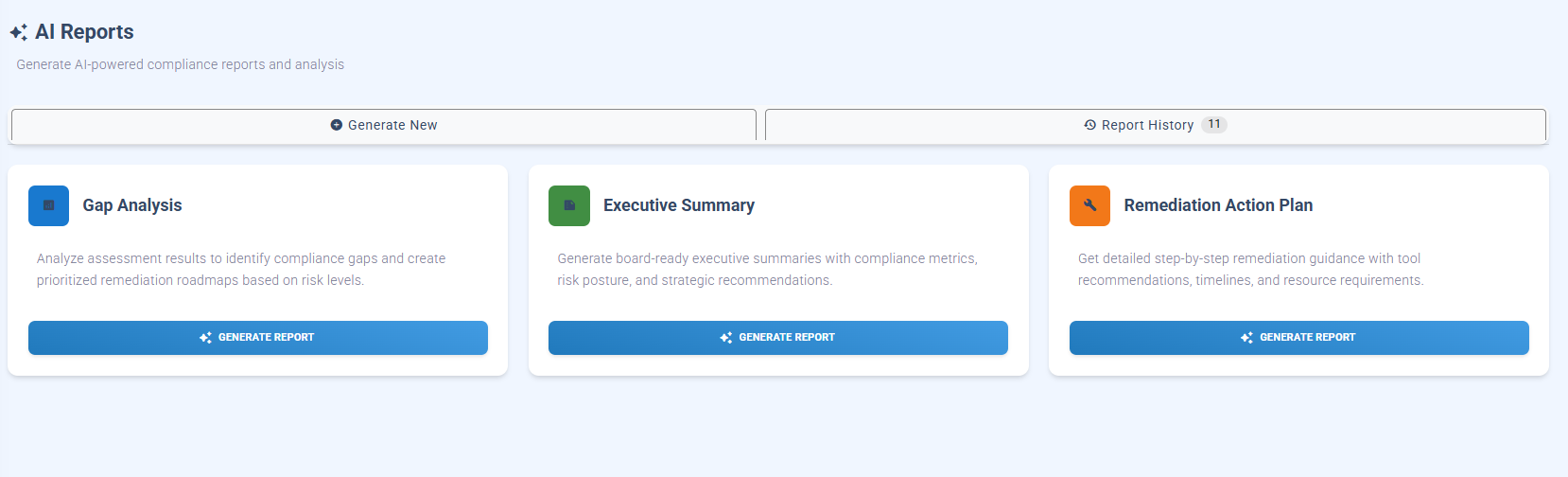
What you're seeing: Three report types: Gap Analysis, Executive Summary, and Remediation Action Plan. Each report is generated from your actual assessment data, tool configurations, and framework requirements. The Report History maintains an audit trail of every AI-generated document.
Why this matters: You're not asking the AI to guess. You're asking it to analyze structured data you've already validated. That's a fundamentally different conversation with an auditor.
"What If My Client Doesn't Want AI Touching Their Data?"
Not every client is ready for AI. Some industries have restrictions. Some clients just aren't comfortable yet.
VERSION 10 treats AI as optional and additive. Every core compliance capability works without AI enabled.
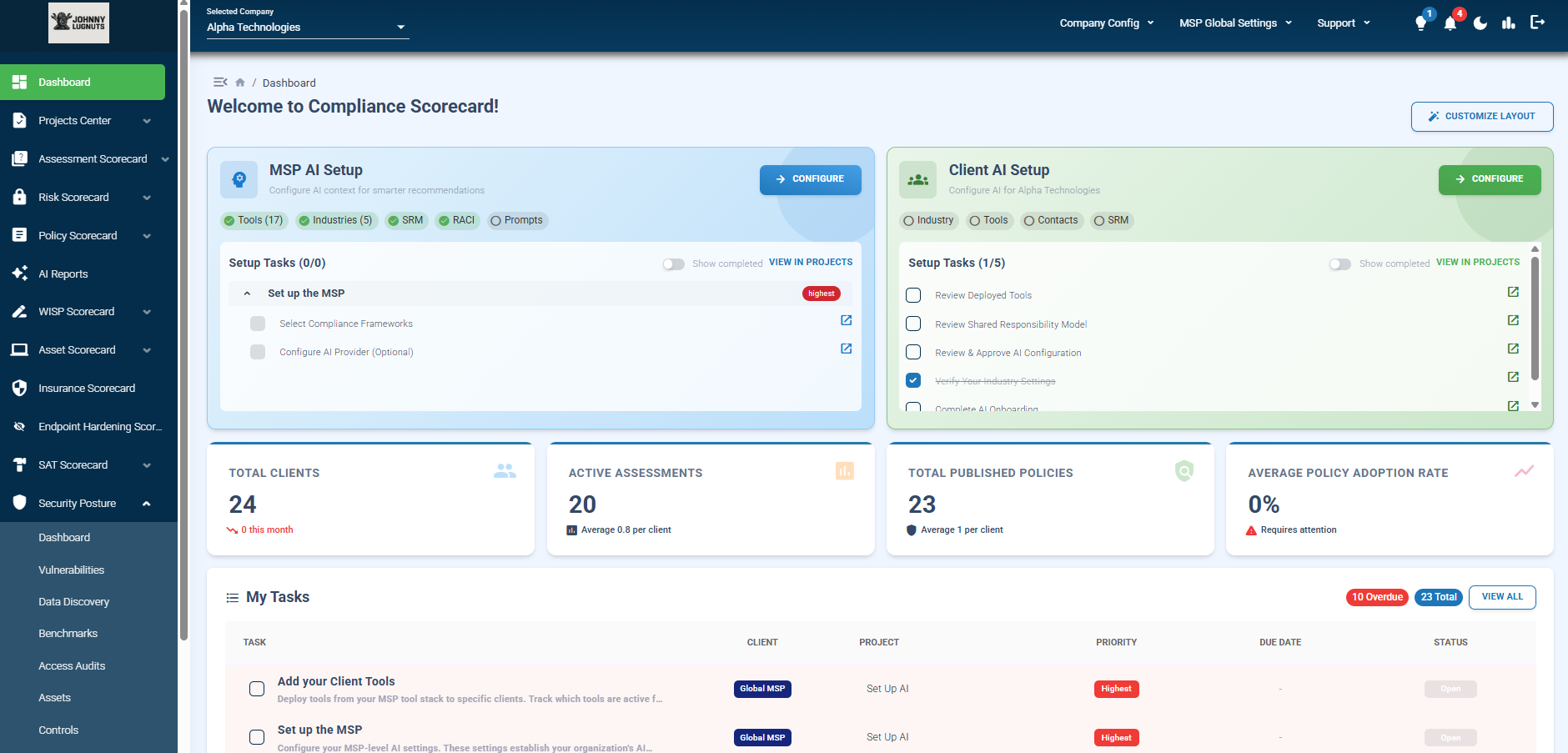
What you're seeing: The main dashboard shows both "MSP AI Setup" and "Client AI Setup" as separate configuration paths. Notice the setup tasks: "Configure AI Provider (Optional)" the word "optional" is intentional. Below that, you can see Total Clients (24), Active Assessments (20), and Published Policies (23) all functioning regardless of AI status.
Why this matters: You can adopt AI at your own pace, client by client. Some clients might get AI-enhanced reports while others stay fully manual. The platform supports both without forcing a choice.
"How Do I Know the AI Understands My Specific Client's Requirements?"
Generic AI doesn't understand GRC. It can't distinguish which controls apply to a healthcare client versus a defense contractor, or which tools in your stack actually address specific CMMC requirements.
VERSION 10 solves this with structured context that gets configured before AI is ever applied.
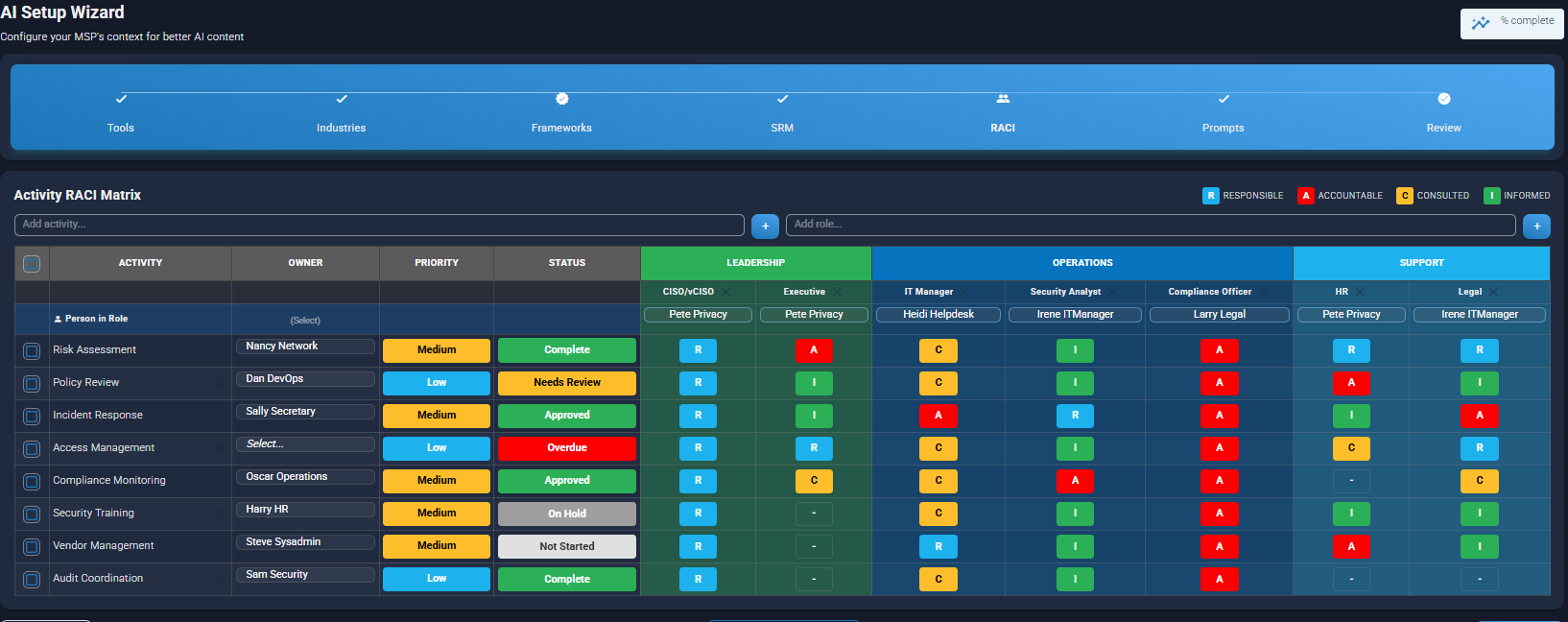
What you're seeing: The AI Setup Wizard walks through Tools, Industries, Frameworks, SRM (Shared Responsibility Model), RACI, and Prompts all before AI generates anything. The RACI Matrix shown here maps specific people to specific compliance activities with defined responsibilities. This becomes context the AI uses when generating recommendations.
Why this matters: The AI isn't guessing who's responsible for incident response at your client. It knows because you configured it. That's the difference between AI as a governance tool and AI as a liability.
The Context That Makes AI Trustworthy
VERSION 10 doesn't start with AI. It starts with structured operational context:
Your Tool Stack
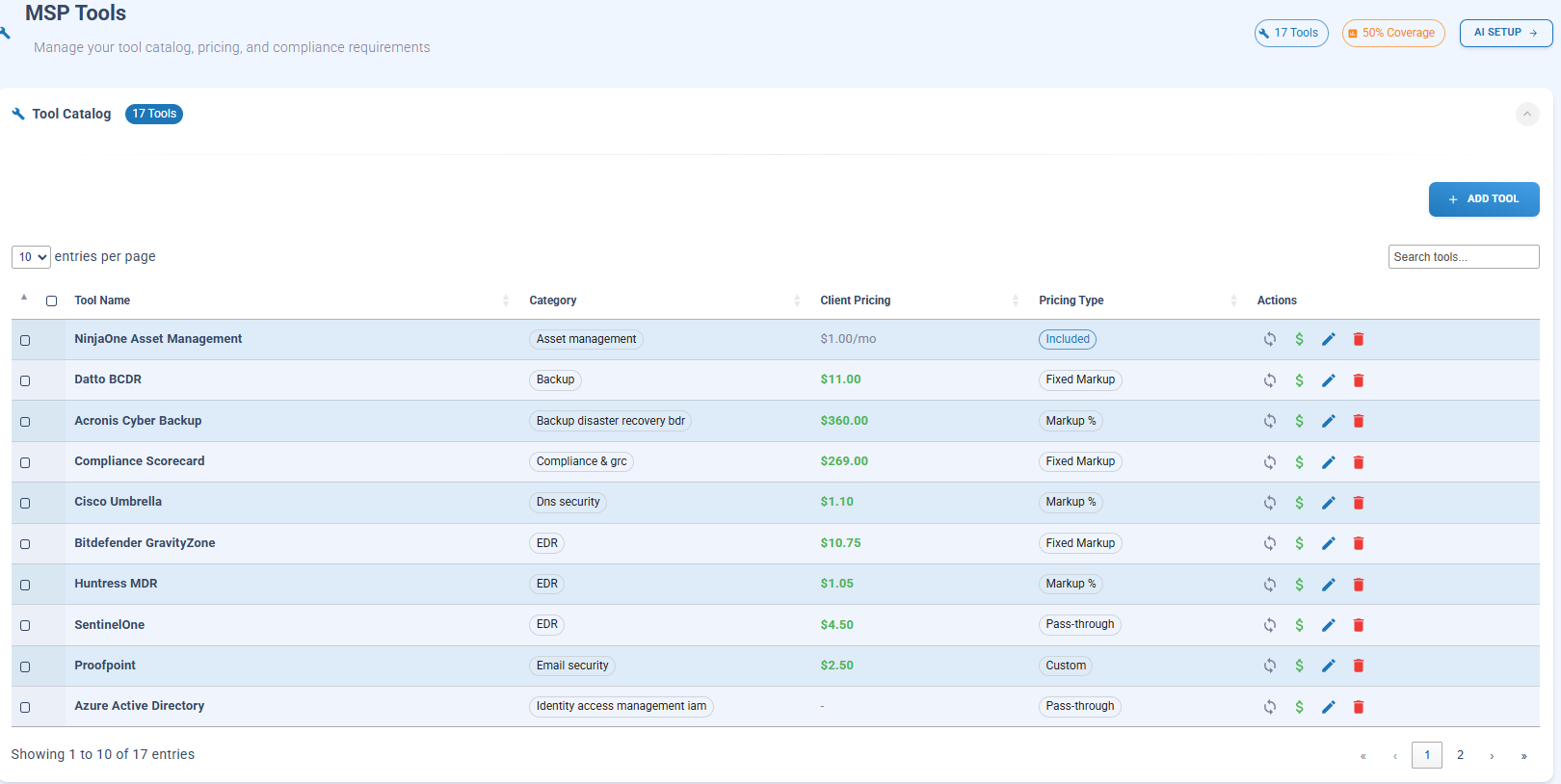
What you're seeing: Your actual tool catalog with all YOUR tools configured such as: NinjaOne, Compliance Scorecard, Huntress MDR, Azure AD. Each tool shows category, client pricing, and pricing type. The "50% Coverage" indicator and "AI SETUP" button connect this data directly to compliance context.
Why this matters: When AI generates a gap analysis, it knows what tools you actually have deployed not what tools exist in the market. Recommendations become actionable because they account for your real stack.
Shared Responsibility Model
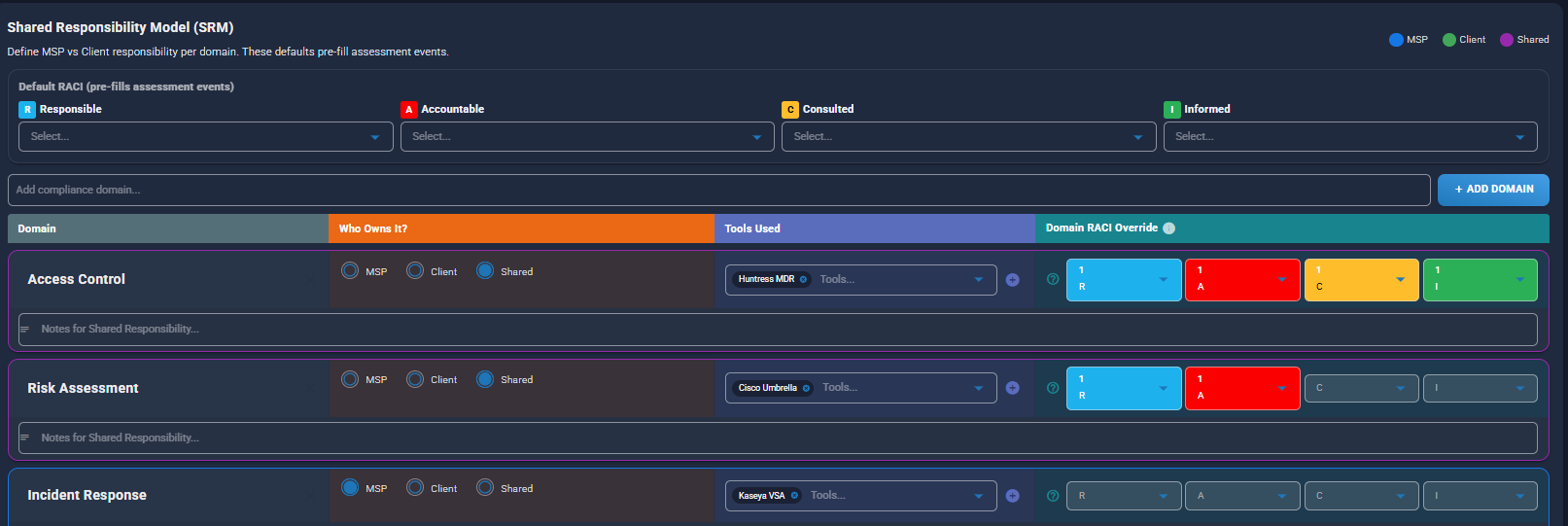
What you're seeing: The SRM configuration defines who owns what MSP, Client, or Shared across compliance domains like Access Control, Risk Assessment, and Incident Response. Each domain maps to specific tools (Huntress MDR, NinjaOne, Azure/M365) and RACI assignments.
Why this matters: When AI generates a policy or assessment question, it understands the division of responsibility. It won't tell your client they need to do something that's actually your job as the MSP.
The Intelligence Layer Behind VERSION 10
This context-driven approach is powered by data we've been building for years.
The Compliance Scorecard Vendor Tool (vendortool.compliancescorecard.com) is a free, publicly accessible database that catalogs:
- 1,200+ security tools across 866+ vendors
- 200,000+ normalized control mappings
- 101+ regulatory and compliance frameworks
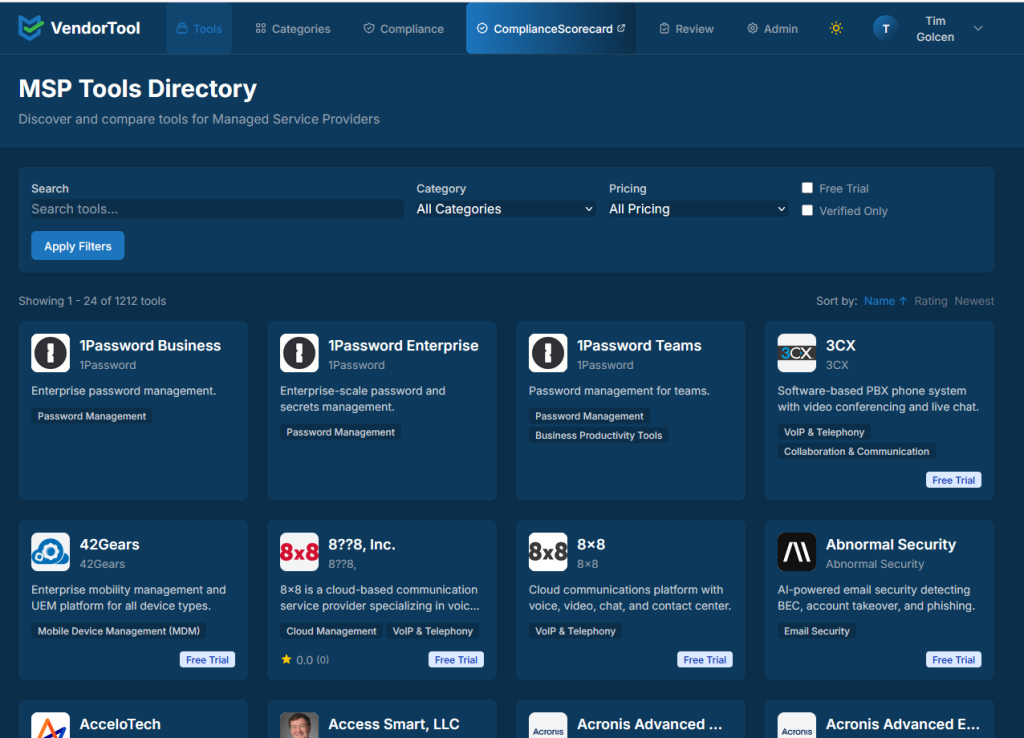
This dataset was built and refined by the MSP peer community. It's intentionally maintained to exclude marketing claims and unsupported vendor assertions.
In VERSION 10, this intelligence becomes operational context. When you add a tool to your stack, the platform already knows which frameworks it supports, which controls it addresses, and where gaps might exist.
Bring Your Own AI Provider
VERSION 10 doesn't lock you into a proprietary AI model.
The platform supports Bring Your Own Key (BYOK) for:
- OpenAI (ChatGPT)
- Microsoft Azure OpenAI
- Anthropic (Claude)
- Google Gemini
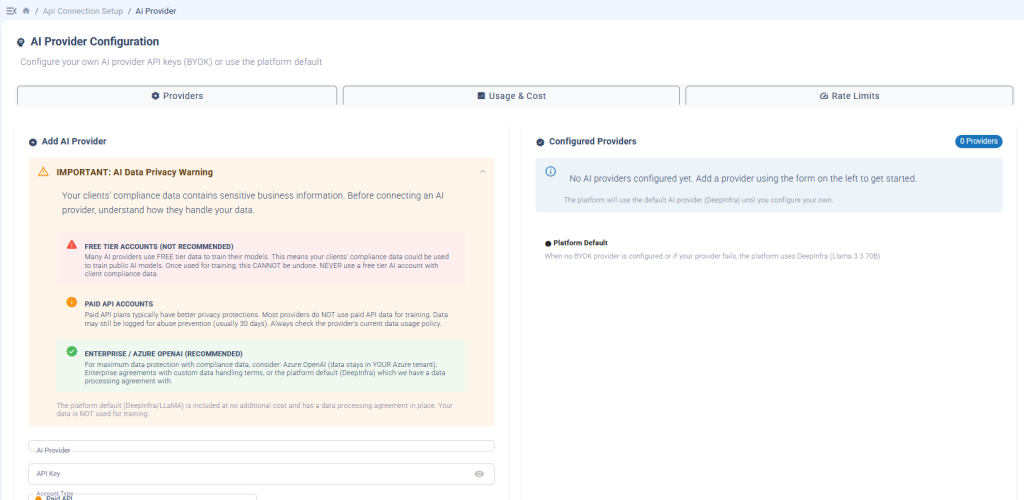
What you're seeing: The AI Provider Configuration screen shows three tiers of data protection guidance. Free tier accounts are flagged as NOT RECOMMENDED because your clients' compliance data could be used for training. Paid API accounts offer better privacy protections. Enterprise/Azure OpenAI is RECOMMENDED for maximum data protection data stays in YOUR Azure tenant.
Why this matters: We don't just let you connect any AI provider we help you understand the data privacy implications of each choice. The platform default (DeepInfra/LLaMA) is included at no additional cost with a data processing agreement in place, so your data is NOT used for training even if you don't configure BYOK.
Your API keys are encrypted using AES-256. You maintain control over which provider processes your data and how.
From Policy Acknowledgment to Informed Behavior
Most GRC platforms treat policy management as a checkbox: publish the policy, get a signature, move on.
VERSION 10 is designed to answer a harder question: Did the person actually understand what they signed?
The platform can generate assessment questions directly from policy content, translate technical language into plain-language explanations, and document comprehension not just acknowledgment.
The goal isn't policy acknowledgment. It's informed behavior.
What VERSION 10 Includes
| Capability | What It Does |
|---|---|
| AI Setup Wizard | Guided configuration for Tools, Industries, Frameworks, SRM, RACI, and Prompts |
| Editable AI Prompts | Organized across 7 workflow categories, all visible and version-controlled |
| AI Reports | Gap Analysis, Executive Summary, and Remediation Action Plans from real assessment data |
| BYOK Support | OpenAI, Azure, Anthropic, Google your keys, your control |
| Optional AI | Every compliance feature works without AI enabled |
| Vendor Tool Integration | 1,200+ tools, 200,000+ control mappings built into the platform |
Availability
VERSION 10 is available now for all Compliance Scorecard customers.
AI capabilities, including BYOK support, are included at no additional cost.
Questions MSPs Ask About VERSION 10
VERSION 10 treats AI as a governed system of context and controls: not a conversational interface. That's the difference between AI as a compliance tool and AI as a compliance risk.