
Core Features
MSP Setup Wizard: 7 Steps to AI That Knows Your Business
Configure once, benefit everywhere. Complete AI onboarding in 20 minutes with automatic client inheritance.
The Generic AI Problem: Wrong Tools, Wrong Context
Most compliance platforms give you AI features with zero configuration. The result? Generic, useless output:
- AI generates policies for tools you don't use
- Recommendations ignore your industry requirements
- Compliance frameworks you don't need to clog every report
- No understanding of MSP vs. client responsibilities
Generic AI treats every MSP the same. That's why you spend 80% of your time editing its output.
The real cost: An MSP generating 10 policies/month wastes 8 hours editing generic AI output. That's $400–$800 in labor costs every month.
The Solution: 7-Step AI Configuration
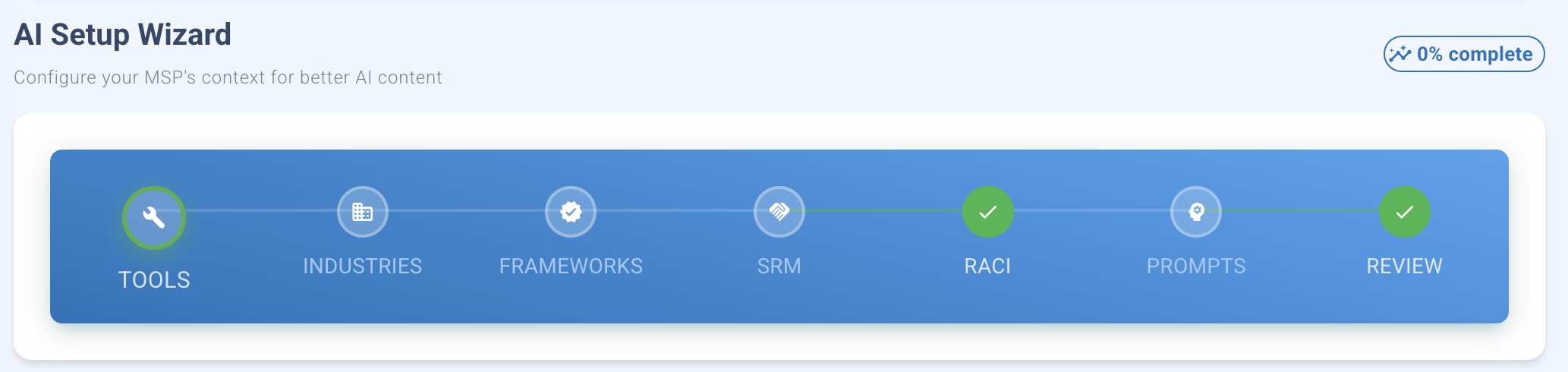
AI Setup Wizard showing 7-step configuration process with progress tracking
The MSP AI Setup Wizard is a guided onboarding process that captures 100+ data points about your business. Complete it once, and every AI feature knows:
- Your tools: 40+ security tools (EDR, SIEM, email, backup, MFA)
- Your industries: Healthcare, finance, legal, manufacturing, etc.
- Your frameworks: NIST CSF, CMMC, ISO 27001, PCI-DSS, SOC 2, HIPAA
- Your responsibilities: What you do vs. what clients do (SRM matrix)
- Your accountability: Who is R/A/C/I for each compliance activity (RACI matrix)
- Your prompts: Customize AI behavior for policy generation, gap analysis, summaries
Result: AI output goes from 60% accurate to 90% accurate. Editing time drops from 80% to 10%.
The 7-Step Wizard: What to Expect
Total time: 20–30 minutes (one-time setup)
Completeness tracking: 0–100% score shows AI readiness at every step
Step 1: Tools (5–10 minutes)
Select the security tools your MSP uses. Categories include:
- EDR (Endpoint Detection & Response)
- SIEM (Security Information & Event Management)
- Email Security (spam filtering, phishing protection)
- Backup & Disaster Recovery
- MFA (Multi-Factor Authentication)
- Password Management
- Vulnerability Management
- Compliance & GRC Tools
40+ tools available. Search, filter by category, select all/none. Your selections ensure AI generates policies and recommendations specific to your stack.
Example impact: Select "CrowdStrike Falcon" → Policy generation includes CrowdStrike-specific EDR controls instead of generic endpoint protection language.
Step 2: Industries (2–3 minutes)
Select the industries you serve. Options include:
- Healthcare (HIPAA, HITECH)
- Finance (PCI-DSS, GLBA, FFIEC)
- Legal (attorney-client privilege, state bar rules)
- Manufacturing (NIST 800-171, CMMC)
- Retail (PCI-DSS, consumer privacy)
- Education (FERPA, state privacy laws)
- Government (FedRAMP, FISMA)
20+ industries available. Industry selection tailors compliance recommendations to sector-specific requirements.
Example impact: Select "Healthcare" → Gap analysis prioritizes HIPAA controls over generic security frameworks.
Step 3: Frameworks (3–5 minutes)
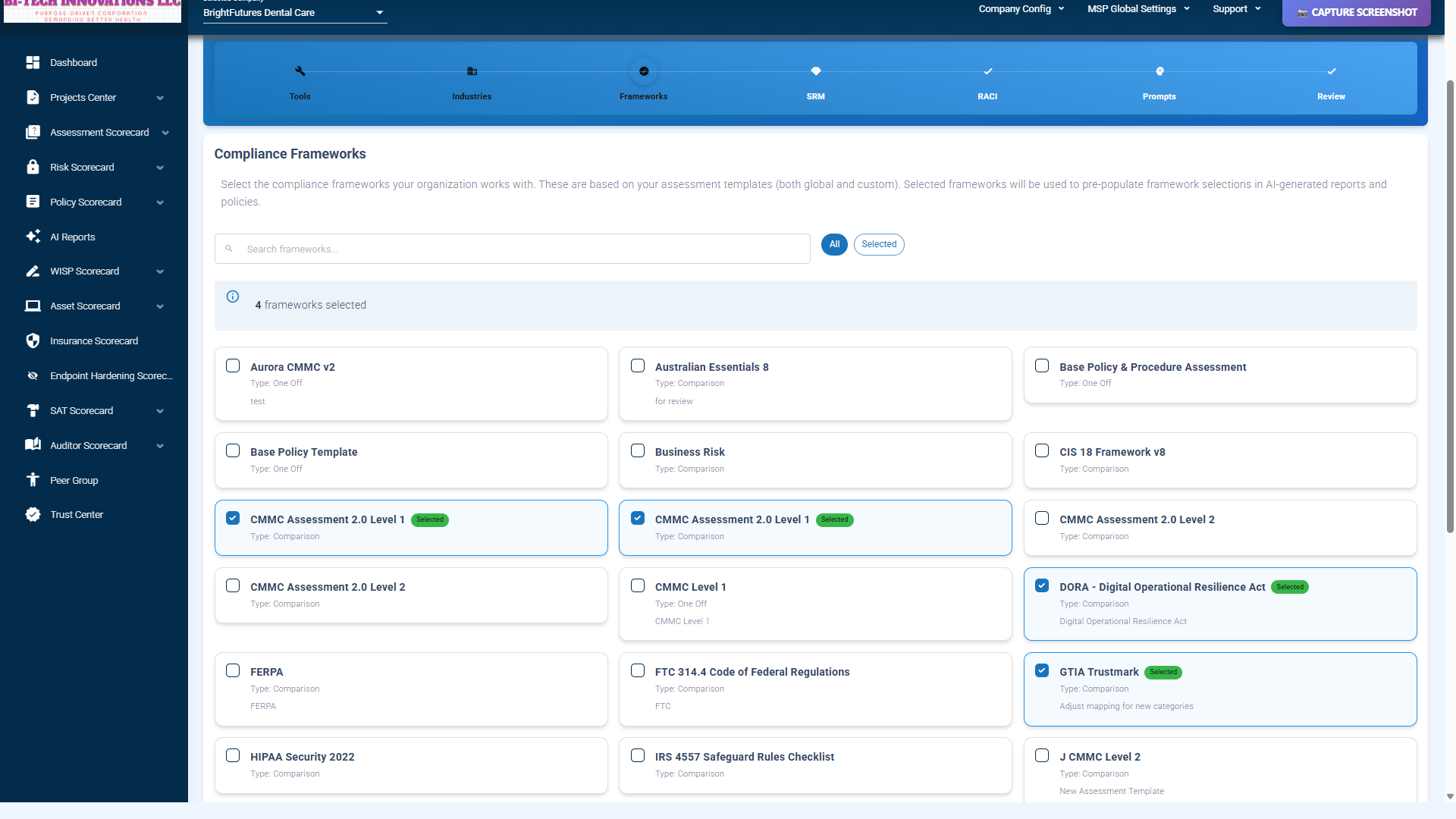
Selecting compliance frameworks (CMMC, ISO 27001, SOC2, NIST) for context
Select the compliance frameworks your MSP and clients must meet:
- NIST Cybersecurity Framework (CSF)
- CMMC (Levels 1, 2, 3)
- ISO 27001
- PCI-DSS
- SOC 2 (Type I, Type II)
- HIPAA Security Rule
- GDPR
- State Privacy Laws (CCPA, CPRA, VCDPA, etc.)
Preview: See how many controls map to your selected tools. Instant gap analysis preview.
Example impact: Select "CMMC Level 2" → AI focuses on 110 CMMC controls instead of 1,200+ generic security recommendations.
Step 4: SRM - Shared Responsibility Matrix (5–10 minutes)
Define what your MSP does vs. what clients do. Assign 30+ compliance controls to:
- MSP Responsible: You own the task (e.g., patch management)
- Client Responsible: Client owns the task (e.g., policy approval)
- Shared: Both contribute (e.g., incident response)
Control categories: Access Control, Incident Response, Patch Management, Backup & Recovery, Policy Management, Risk Assessments, Audit Logging, Security Awareness Training, etc.
Bulk actions available: "Assign all to MSP" or import standard MSP templates.
Example impact: Mark "Patch Management" as MSP Responsible → AI recommends MSP-side automation tools instead of client-side instructions.
Step 5: RACI Matrix (5–10 minutes)
Assign roles for each compliance activity. For every task, specify:
- Responsible: Who does the work? (MSP / Client / Both)
- Accountable: Who approves? (MSP / Client)
- Consulted: Who is consulted? (MSP / Client / Both / None)
- Informed: Who is kept informed? (MSP / Client / Both / None)
Example activities: Patch Management, Policy Approval, Risk Assessments, Incident Response, Security Awareness Training, Audit Coordination, Compliance Reporting.
Example impact: Assign "Policy Approval" to Client as Accountable → AI generates policies with "Approved by: [Client Name]" instead of MSP.
Step 6: Prompts (5–15 minutes, OPTIONAL)
View and customize AI prompt templates. Prompt types include:
- Policy Generation (security policies, privacy policies, incident response plans)
- Gap Analysis (framework compliance reports)
- Executive Summaries (board-ready risk summaries)
- Test Question Generator (security awareness training)
- Plain Language Mode (translate compliance jargon)
System baseline: See the default prompt (read-only).
Custom prompts: Add your MSP's voice, variables, or industry-specific requirements.
Variable substitution: Use {company_name}, {tools}, {frameworks}, {industry} for dynamic content.
Advanced settings: Temperature slider (0.0–1.0), max tokens (50–50,000).
Can skip: Default prompts are production-ready. Customization is optional.
Step 7: Review (2–5 minutes)
Preview all configurations before activation:
- Tools selected: Count + list
- Industries selected: Count + list
- Frameworks selected: Count + list
- SRM completion: Percentage of controls assigned
- RACI completion: Percentage of activities assigned
- Prompts customized: Count of modified prompts
- Overall completeness score: 0–100%
Edit buttons: Return to any step to modify.
Save & Activate: Click to make context live. All AI features apply your configuration immediately.
Completeness Score: Quantified AI Readiness
The wizard calculates a completeness score based on how much context you provide:
- Tools: 30 points (most critical)
- Industries: 20 points
- Frameworks: 15 points
- SRM: 15 points
- RACI: 15 points
- Prompts: 5 points (optional)
- Total: 100 points
Impact on AI accuracy:
- 0% complete (no setup): 60% AI accuracy, 40% editing needed
- 50% complete (partial setup): 75% accuracy, 25% editing
- 100% complete (full setup): 90% accuracy, 10% editing
ROI calculation: 20 minutes of setup saves 6.4 hours/month in editing time. Break-even after the first week.
Client Inheritance: Configure Once, Benefit Everywhere
The MSP AI Setup Wizard is completed once at the MSP level. All client organizations automatically inherit your configuration.
How Inheritance Works
MSP configures:
- Tools: CrowdStrike, Datto, Mimecast, 1Password, etc.
- Industries: Healthcare, Finance, Legal
- Frameworks: NIST CSF, CMMC, HIPAA
- SRM: MSP handles patches, backups; Client handles policy approval
- RACI: MSP Responsible for incident response, Client Accountable for policy
Clients automatically get:
- Same tool stack (AI knows CrowdStrike/Datto are in use)
- Industry-specific compliance (HIPAA for healthcare clients, PCI-DSS for retail)
- Pre-configured SRM (clear MSP vs. client responsibilities)
- Pre-configured RACI (no ambiguity on who does what)
- Custom prompts (if MSP customized them)
Client Overrides (Roadmap Q2 2026)
Future release will allow individual clients to override inherited settings:
- Client has additional tools (e.g., uses Okta for SSO)
- Client has unique compliance requirements (e.g., PCI-DSS for payment processing)
- Client has custom RACI assignments (e.g., internal IT team)
Current behavior: MSP settings apply to all clients (no per-client overrides yet).
Project Integration: Task Tracking Built-In
The wizard integrates with Project Center for task management.
Create AI Setup Project
On wizard start, you can create an "AI Setup" project with tasks for each step:
- Task 1: Select Tools
- Task 2: Select Industries
- Task 3: Select Frameworks
- Task 4: Configure SRM Matrix
- Task 5: Configure RACI Matrix
- Task 6: Customize Prompts (optional)
- Task 7: Review & Activate
As you complete each wizard step, tasks auto-complete. Project progress tracks alongside wizard progress.
Team Notifications
When the wizard is complete, team members receive notifications:
- "AI Setup Complete! Context is now active."
- Project marked 100% complete
- Dashboard widgets updated
MSP Onboarding Automation: Zero-Touch Provisioning
The wizard is the first step in fully automated MSP onboarding. Here's the complete onboarding flow:
Full Onboarding Workflow
- Step 1: MSP Admin completes 7-step AI Setup Wizard (20 minutes)
- Step 2: Context activated → AI features immediately use MSP configuration
- Step 3: Add client organizations (import from PSA or manual entry)
- Step 4: Clients inherit MSP configuration (zero setup required per client)
- Step 5: AI generates client-specific policies, gap analyses, reports automatically
Time Savings: Manual vs. Automated
Manual MSP client onboarding (traditional):
- Setup per client: 2–4 hours
- 10 clients: 20–40 hours
- 100 clients: 200–400 hours
Automated MSP client onboarding (Compliance Scorecard):
- MSP wizard setup: 20 minutes (one time)
- Add 10 clients: 5 minutes (bulk import)
- Add 100 clients: 10 minutes (bulk import)
- Time saved per 10 clients: 19.5–39.5 hours
- Time saved per 100 clients: 199.5–399.5 hours
ROI for 100-client MSP: 200–400 hours saved = $10,000–$20,000 in labor costs (at $50/hr).
Before/After: AI Output Comparison
See the impact of wizard configuration on AI accuracy.
Before Setup (Generic AI)
Prompt: "Generate an incident response policy for our MSP."
AI Output (Generic):
Incident Response Policy
1. Use your security monitoring tool to detect incidents.
2. Classify incidents by severity.
3. Notify the security team.
4. Contain the incident using firewalls and endpoint protection.
5. Document the incident in your ticketing system.
6. Conduct a post-incident review.
Problems: No tool names, no MSP/client responsibilities, no compliance frameworks referenced. Requires 80% editing.
After Setup (Context-Aware AI)
Prompt: "Generate an incident response policy for our MSP."
AI Output (Context-Aware):
Incident Response Policy - [MSP Name]
Frameworks: NIST CSF, CMMC Level 2, HIPAA Security Rule1. Detection (MSP Responsible): CrowdStrike Falcon EDR alerts trigger automated incident creation in ConnectWise PSA.
2. Classification (MSP Responsible): Classify incidents using NIST CSF severity levels (Low, Medium, High, Critical).
3. Notification (Shared): MSP notifies client within 1 hour for High/Critical incidents. Client is Informed, MSP is Responsible.
4. Containment (MSP Responsible): Isolate affected endpoints via CrowdStrike, block malicious IPs via firewall.
5. Documentation (MSP Responsible, Client Informed): Document all actions in ConnectWise with timestamps, affected systems, actions taken.
6. Post-Incident Review (Shared): MSP conducts technical review, Client approves remediation plan (Client Accountable).
Improvements: Tool names (CrowdStrike, ConnectWise), MSP/client responsibilities (SRM), RACI roles, compliance frameworks. Requires 10% editing.
Accuracy Impact
- Generic AI: 60% accurate, 40% editing needed (32 minutes editing per policy)
- Context-Aware AI: 90% accurate, 10% editing needed (8 minutes editing per policy)
- Time saved per policy: 24 minutes
- Time saved per 10 policies/month: 4 hours
- Time saved per 50 policies/month: 20 hours ($1,000/month labor savings at $50/hr)
Dashboard Widgets: Track Setup Progress
After starting the wizard, dashboard widgets show real-time progress:
MSP AI Setup Widget
- Progress bar: 0–100%
- Completeness score: "75% Complete"
- Status: "In Progress" / "Completed"
- Quick action: "Resume Setup" button
Setup Task List
If project created, dashboard shows task list:
- ✅ Step 1: Tools (Completed)
- ✅ Step 2: Industries (Completed)
- ✅ Step 3: Frameworks (Completed)
- 🔄 Step 4: SRM (In Progress)
- ⚪ Step 5: RACI (Not Started)
- ⚪ Step 6: Prompts (Optional)
- ⚪ Step 7: Review (Not Started)
Wizard Behavior: Save & Resume Anytime
The wizard is designed for flexibility. You don't need to complete it in one session.
Auto-Save on Every Step
Each time you click "Next", your selections are saved to the database. Close the wizard anytime and resume later.
Edit After Activation
After completing the wizard, you can return to modify settings:
- Add new tools as you adopt them
- Add new industries as you expand your client base
- Add new frameworks as compliance requirements evolve
- Adjust SRM/RACI as responsibilities change
Changes apply immediately (no re-activation required).
Validation & Error Handling
- Network errors: Auto-retry with exponential backoff
- Validation errors: Inline error messages, can't proceed until fixed
- Auto-save failures: Warning banner, can retry or skip
- Empty selections: Warnings shown, but some steps allow empty (optional)
Competitive Comparison: Wizard vs. Settings Pages
Most compliance platforms have basic "settings" pages. Compliance Scorecard has a guided wizard. Here's why that matters:
Competitor A: Basic Settings Page
- Configuration: Upload logo, set company name
- AI Setup: Choose AI provider (OpenAI / Claude)
- Result: Generic AI with no context
Competitor B: No Configuration
- Configuration: None (hardcoded)
- AI Setup: Not available
- Result: One-size-fits-all compliance
Compliance Scorecard: 7-Step Wizard
- Configuration: 100+ data points across 7 steps
- AI Setup: Tools, industries, frameworks, SRM, RACI, custom prompts
- Result: Context-aware AI with 90% accuracy
Unique Features
| Feature | Compliance Scorecard | Competitor A | Competitor B |
|---|---|---|---|
| Guided Wizard | ✅ 7 steps | 🟡 Basic settings | ❌ No wizard |
| Tool Selection | ✅ 40+ tools | ❌ No | ❌ No |
| Industry Context | ✅ 20+ industries | ❌ No | ❌ No |
| SRM Matrix | ✅ 30+ controls | ❌ No | ❌ No |
| RACI Matrix | ✅ Per-activity | ❌ No | ❌ No |
| Custom Prompts | ✅ Per prompt type | ❌ No | 🟡 Global only |
| Completeness Scoring | ✅ 0–100% | ❌ No | ❌ No |
| Client Inheritance | ✅ Automatic | ❌ No | ❌ No |
Real MSP Use Case: 100-Client Deployment
An MSP with 100 clients completes the wizard. Here's the impact:
Time Investment
- MSP Setup Wizard: 25 minutes (one time)
- Add 100 clients: 10 minutes (bulk import from PSA)
- Total time: 35 minutes
Time Savings vs. Manual Setup
- Manual setup per client: 2 hours (configure tools, frameworks, responsibilities)
- Manual setup for 100 clients: 200 hours
- Automated setup for 100 clients: 35 minutes
- Time saved: 199.5 hours
Cost Savings
- Labor rate: $50/hr (MSP technician)
- Manual cost: 200 hours × $50 = $10,000
- Automated cost: 35 minutes × $50/hr = $29
- Savings: $9,971
Ongoing Benefit
Every AI-generated policy, gap analysis, or report is 90% accurate instead of 60%:
- Policies generated per month: 50 (0.5 per client)
- Editing time per policy (generic AI): 32 minutes
- Editing time per policy (context-aware AI): 8 minutes
- Time saved per policy: 24 minutes
- Monthly time savings: 50 × 24 = 1,200 minutes = 20 hours
- Monthly labor savings: 20 hours × $50 = $1,000/month
- Annual savings: $12,000/year
ROI Summary
- One-time savings: $9,971 (onboarding automation)
- Ongoing savings: $12,000/year (AI editing time reduction)
- Total Year 1 savings: $21,971
- Setup time investment: 35 minutes
- ROI: 37,618:1 (time invested vs. value generated)
Limitations & Roadmap
We believe in transparency. Here's what you should know:
Current Limitations
- Sequential steps: Must complete steps in order (can't skip to Step 5). Rationale: Later steps depend on earlier data.
- No template import/export: Cannot import settings from another MSP or export to share with partners. Roadmap: Q2 2026.
- No bulk data entry: Must select tools/industries via UI (no CSV import). Workaround: "Select All" then deselect unwanted items.
- No version history: Changes overwrite previous settings (no rollback to previous configuration). Roadmap: Q4 2026.
- Client overrides not available: Currently MSP settings apply to all clients (no per-client customization). Roadmap: Q2 2026.
Roadmap
- Q2 2026: Import/export configurations, client-level overrides, template library
- Q3 2026: Mobile-responsive wizard, bulk CSV import
- Q4 2026: Version history & rollback, AI-suggested configurations
Who Benefits from the MSP Setup Wizard?
MSPs with 10+ Clients
Configure once, and all clients inherit settings. Eliminates per-client setup time.
MSPs Serving Multiple Industries
Select all industries you serve (healthcare, finance, legal, etc.). AI tailors compliance recommendations per client.
MSPs with Complex Tool Stacks
40+ tools available. AI generates CrowdStrike-, Datto-, Mimecast-, and 1Password-specific policies.
MSPs with Shared Responsibility Models
Define clear MSP vs. client responsibilities. No ambiguity on who does what.
MSPs Seeking Onboarding Automation
Reduce onboarding from 2 hours/client to 5 minutes/client. Scale to 100+ clients without adding staff.
Get Started with the MSP Setup Wizard
The MSP AI Setup Wizard is included with v10 at no additional cost. Complete setup in 20 minutes.
Questions? Read the FAQ or contact our team.