
Core Features
Your AI, Your Rules - Customize Every Prompt Without Code
Override system defaults with 35 customizable AI prompts. Fine-tune AI behavior for your MSP's unique needs, no coding required.
The Fixed Prompt Problem: One Size Doesn't Fit All
Most compliance platforms give you AI features, but you can't change how the AI behaves. You're stuck with:
- Generic outputs that don't match your MSP's voice or methodology
- AI that doesn't understand your industry vertical (healthcare, finance, manufacturing)
- No way to emphasize your preferred frameworks or tools
- Outputs that require heavy editing before client delivery
When the AI is trained on generic compliance, your deliverables sound generic too.
Custom Prompt Overrides: Train the AI Your Way
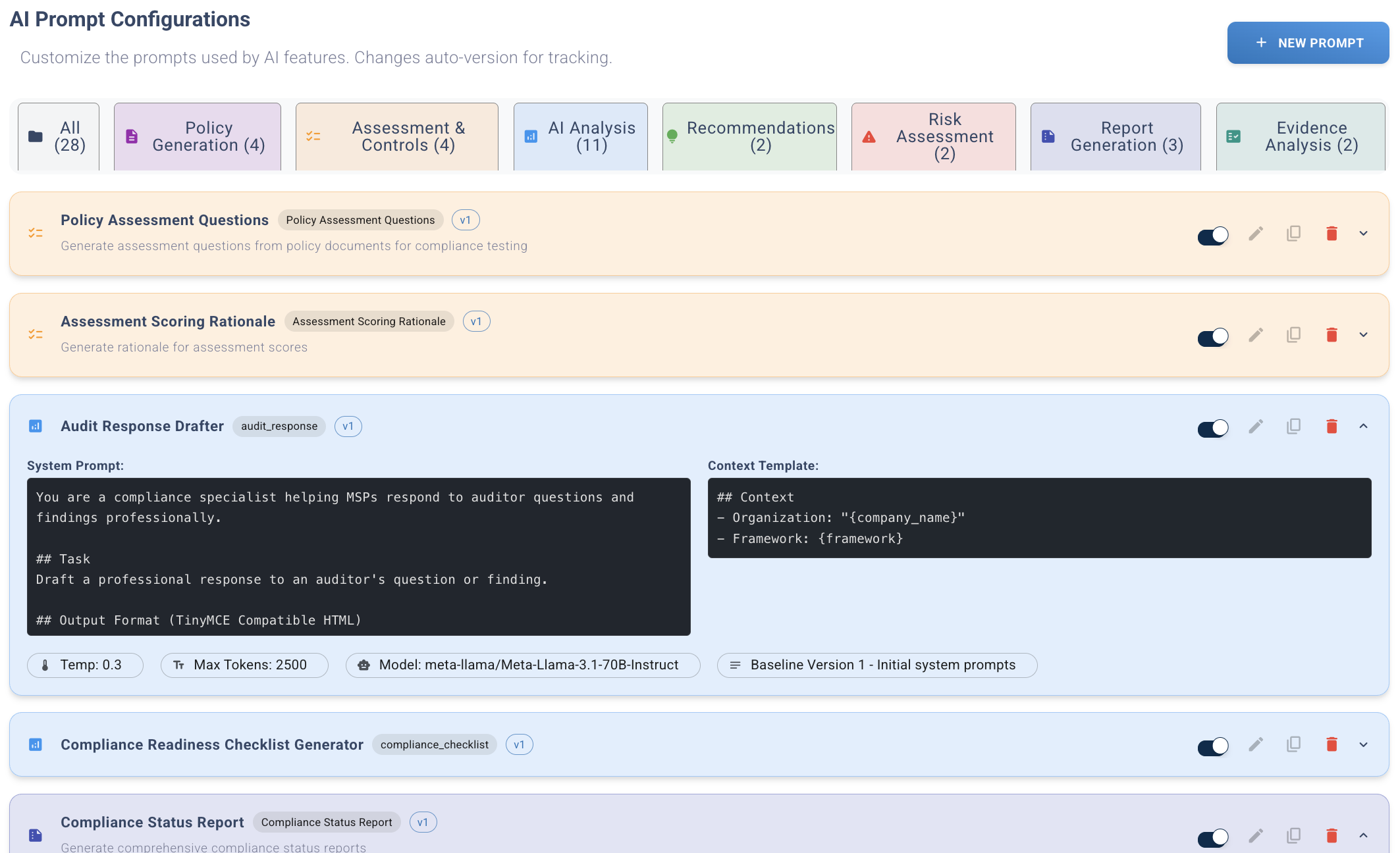
Custom Prompt Overrides let MSPs customize how the AI generates compliance content. Override system defaults with your own instructions.
35 Customizable Prompt Types
Every AI feature in Compliance Scorecard has a customizable prompt. Override any or all:
Policy Generation (5 prompts)
- Policy Draft: Full policy document generation
- Policy Section Generator: Individual section creation
- Policy Questions: Employee awareness quiz generator
- Policy Analysis: Gap identification and recommendations
- Policy ELI5: Plain language explanations
Assessment & Scoring (4 prompts)
- Assessment Questions: Custom questionnaire generation
- Assessment Scoring: Scoring logic and weights
- Control Questions: Framework-specific control testing
- Control Explanation: Plain language control descriptions
Reports & Analysis (6 prompts)
- Gap Analysis: Compliance gap identification
- Executive Summary: C-suite friendly summaries
- Remediation Plan: Action plan generation
- Risk Assessment: Risk analysis and prioritization
- Compliance Posture: Overall compliance scoring
- Framework Readiness: CMMC/ISO/SOC2 readiness reports
Evidence & Tools (4 prompts)
- Evidence Validation: Evidence sufficiency analysis
- Evidence Summary: Evidence cataloging
- Evidence Request: Missing evidence identification
- Tool Recommendations: Security tool suggestions
Compliance Operations (4 prompts)
- Compliance Report: Formal compliance reporting
- Compliance Checklist: Task list generation
- Compliance Trend: Trend analysis over time
- POAM Generator: Plan of Action & Milestones
Risk Management (2 prompts)
- Risk Analysis: Threat and vulnerability assessment
- Risk Register Item: Risk documentation
Training & Incident Response (3 prompts)
- Training Material: Employee training content
- Audit Response: Auditor question responses
- Incident Report: Security incident documentation
Content Creation (2 prompts)
- Video Script: Training video scripts
- Web Scraper Analysis: External content analysis
Fine-Tune AI Behavior Without Code
Every prompt has four customizable components:
1. System Prompt (AI Role & Instructions)
Tell the AI who it is and what its job is:
Default: "You are a compliance expert generating CMMC policies."
Your Override: "You are a cybersecurity consultant specializing in healthcare compliance. Generate HIPAA-aligned policies with HHS guidance citations. Use formal medical terminology. Always reference the Security Rule where applicable."
2. Context Template (Variables to Include)
Define what information the AI should use. 7 available variables:
{{TOOLS}}- Client's deployed security tools (EDR, SIEM, backup, etc.){{INDUSTRY}}- Client industry (healthcare, finance, manufacturing, etc.){{FRAMEWORKS}}- Compliance frameworks (CMMC, HIPAA, ISO 27001, SOC2){{COMPANY_NAME}}- Client company name{{EMPLOYEE_COUNT}}- Number of employees{{HEADQUARTERS_COUNTRY}}- Country code (US, CA, UK, etc.){{CUSTOM_CONTEXT}}- Free-form custom context from client profile
Example: "Client operates in {{INDUSTRY}} with {{EMPLOYEE_COUNT}} employees. Deployed tools: {{TOOLS}}. Must comply with {{FRAMEWORKS}}."
3. User Prompt Template (Input Formatting)
Format how user input is presented to the AI:
Default: "Generate a policy for: {user_input}"
Your Override: "Generate a policy for: {user_input}. Format for healthcare providers. Include patient privacy considerations. Cite HIPAA Security Rule 164.308(a)(1)(i) where applicable."
4. Model Parameters (Temperature, Tokens, Model)
Control AI behavior:
- Temperature (0-1): 0 = consistent/deterministic, 1 = creative/varied (default: 0.7)
- Max Tokens (100-4000): Maximum output length (default: 1500)
- Model: gpt-4o, gpt-4o-mini, claude-3-5-sonnet, etc.
Use case: Lower temperature (0.3) for technical controls, higher temperature (0.8) for training content.
How Custom Prompt Overrides Work (No Code Required)
Step 1: Access Prompts Library
Navigate to: Dashboard → AI Setup → Prompts (Step 6)
See available prompt types with descriptions. Filter by category (Policy, Assessment, Reports, Evidence, Training). Join our early adopter program for expanded prompt library access.
Step 2: Select Prompt Type to Customize
Click any prompt type to open the editor. Example: "Policy Draft" prompt.
See the current system default prompt (what all MSPs use unless overridden).
Step 3: Edit Prompt Components
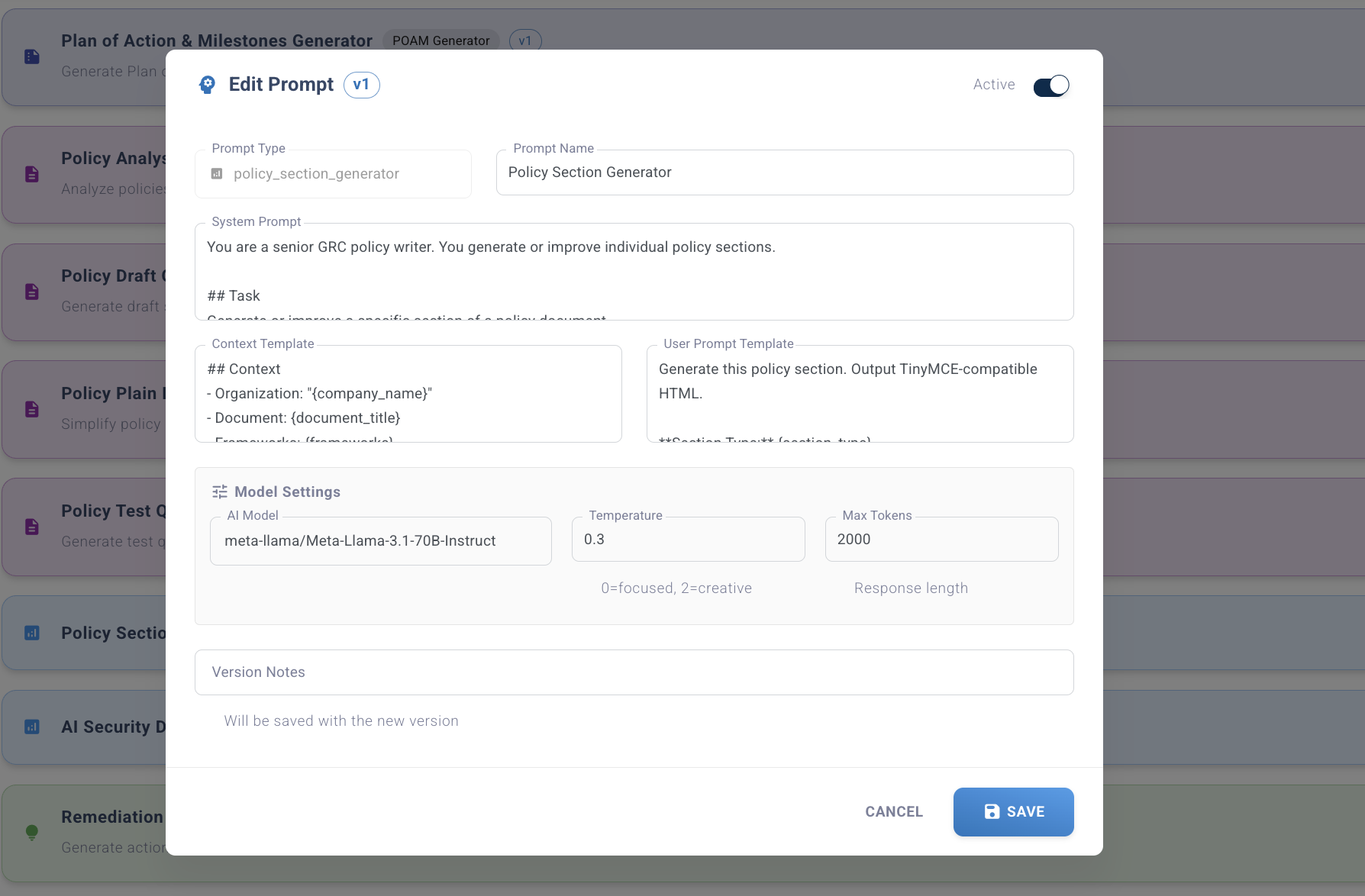
Customize any or all four components:
- System Prompt: Edit AI role and instructions in plain English
- Context Template: Add/remove variables ({{TOOLS}}, {{INDUSTRY}}, etc.)
- User Prompt Template: Format how user input is presented
- Parameters: Adjust temperature, max_tokens, model
Step 4: Test Your Prompt
Click "Test Prompt" to generate sample output using your custom prompt.
Compare default vs. custom output side-by-side. Iterate until the output matches your quality standards.
Step 5: Save MSP-Specific Override
Click "Save Override" to store your custom prompt.
All future AI generations for this prompt type use YOUR version, not the system default.
Real-World Use Cases: Customize for Your Niche
Healthcare MSP: HIPAA-First Policies
Challenge: Generic CMMC policies don't address HIPAA requirements.
Solution: Override "Policy Draft" prompt:
System Prompt: "You are a HIPAA compliance consultant. Generate policies that satisfy both CMMC and HIPAA Security Rule. Always cite HHS guidance. Use healthcare terminology (PHI, BAA, covered entities)."
Context: "Client operates in {{INDUSTRY}} with {{EMPLOYEE_COUNT}} staff. Must comply with {{FRAMEWORKS}}. Uses {{TOOLS}} for PHI protection."
Result: Policies include HIPAA citations, healthcare context, and PHI-specific controls.
Financial Services MSP: PCI-DSS Focus
Challenge: Clients handle credit card data, but AI doesn't mention PCI-DSS.
Solution: Override "Gap Analysis" prompt:
System Prompt: "You are a PCI-DSS QSA. Analyze compliance gaps for organizations handling cardholder data. Reference PCI-DSS v4.0 requirements. Prioritize compensating controls if the client can't meet a requirement."
Context: "Client processes credit cards in {{INDUSTRY}}. Frameworks: {{FRAMEWORKS}}. Deployed tools: {{TOOLS}}."
Result: Gap analysis includes PCI-DSS requirements, compensating controls, and merchant level classification.
Manufacturing MSP: NIST SP 800-171 Emphasis
Challenge: Defense contractors need NIST 800-171 language, not generic cybersecurity.
Solution: Override "Executive Summary" prompt:
System Prompt: "You are a CMMC consultant preparing reports for defense contractors. Use NIST SP 800-171 terminology. Reference DFARS clauses. Explain CUI protection requirements."
Context: "Client is a defense contractor in {{INDUSTRY}} handling CUI. Must achieve CMMC Level 2. Uses {{TOOLS}}."
Result: Executive summaries include DFARS references, CUI context, and CMMC certification readiness.
International MSP: Regional Compliance
Challenge: Clients in Canada/UK/EU need PIPEDA/GDPR language, not just US frameworks.
Solution: Override "Policy Draft" prompt with location-aware logic:
System Prompt: "You are a global compliance consultant. If {{HEADQUARTERS_COUNTRY}} is CA, reference PIPEDA. If UK/EU, reference GDPR. Include data residency requirements for each region."
Context: "Client operates in {{HEADQUARTERS_COUNTRY}} in {{INDUSTRY}}. Frameworks: {{FRAMEWORKS}}. Data residency: {{HEADQUARTERS_COUNTRY}} servers required."
Result: Policies automatically adapt to regional compliance requirements based on client location.
Prompt Hierarchy: How Overrides Work
The system uses a 3-tier hierarchy to determine which prompt to use:
Tier 1: System Baseline (Default for All MSPs)
Compliance Scorecard's default prompts. Used if no override exists.
Who sets it: Compliance Scorecard engineering team
Quality level: Production-tested, works for 90% of use cases
Tier 2: MSP Override (Your Custom Prompt)
Your custom prompt. Used for all your clients.
Who sets it: MSP admin configures in AI Setup
Scope: All clients under this MSP
Tier 3: Client Override (Roadmap Q2 2026)
Client-specific prompt. Highest priority.
Who sets it: MSP admin (for specific clients with unique requirements)
Use case: One client needs healthcare-specific policies, others don't
Resolution logic:
- Check for Client Override (not yet available)
- Check for MSP Override → Use if exists
- Fall back to System Baseline
Variable System: Dynamic Context Injection
Variables automatically pull client-specific data into prompts. No manual data entry required.
Available Variables (7)
{{TOOLS}} - Deployed Security Tools
Pulled from client's Integration Setup (Step 3).
Example value: "CrowdStrike EDR, Microsoft Defender, Veeam Backup, KnowBe4 Security Awareness, Duo MFA"
Use case: AI recommends policies/controls that leverage tools already deployed.
{{INDUSTRY}} - Client Industry
Pulled from client profile.
Example value: "Healthcare - Medical Practice", "Financial Services - Wealth Management", "Manufacturing - Defense Contractor"
Use case: AI includes industry-specific compliance requirements and terminology.
{{FRAMEWORKS}} - Compliance Frameworks
Pulled from Assessment Setup (Step 2).
Example value: "CMMC 2.0 Level 2, HIPAA Security Rule, NIST CSF"
Use case: AI generates content that satisfies all selected frameworks.
{{COMPANY_NAME}} - Client Company Name
Pulled from client profile.
Example value: "Acme Healthcare Partners"
Use case: Personalize policy headers, reports, and training materials.
{{EMPLOYEE_COUNT}} - Number of Employees
Pulled from client profile.
Example value: "250", "1-10", "500+"
Use case: AI scales recommendations (small business vs. enterprise controls).
{{HEADQUARTERS_COUNTRY}} - Country Code
Pulled from client profile.
Example value: "US", "CA", "UK", "AU"
Use case: Regional compliance (GDPR, PIPEDA, Australian Privacy Principles).
{{CUSTOM_CONTEXT}} - Free-Form Custom Context
MSP-defined free text field in client profile.
Example value: "Handles CUI for DoD contracts. Requires CMMC Level 2 certification by Q3 2026. Uses Azure Government Cloud for data residency."
Use case: Add unique client requirements that don't fit other variables.
Example: Variables in Action
Context Template:
"Client: {{COMPANY_NAME}} ({{EMPLOYEE_COUNT}} employees)
Industry: {{INDUSTRY}}
Location: {{HEADQUARTERS_COUNTRY}}
Compliance: {{FRAMEWORKS}}
Deployed Tools: {{TOOLS}}
Additional Context: {{CUSTOM_CONTEXT}}"
Populated Example:
"Client: Acme Healthcare Partners (250 employees)
Industry: Healthcare - Medical Practice
Location: US
Compliance: CMMC 2.0 Level 2, HIPAA Security Rule
Deployed Tools: CrowdStrike EDR, Microsoft Defender, Veeam Backup, KnowBe4, Duo MFA
Additional Context: Handles CUI for DoD contracts. Requires CMMC Level 2 certification by Q3 2026."
Model Parameters: Fine-Tune AI Behavior
Temperature (0.0 - 1.0)
Controls randomness/creativity:
- 0.0-0.3 (Low): Consistent, deterministic, technical
Use for: Control descriptions, scoring logic, compliance checklists - 0.4-0.7 (Medium): Balanced, professional
Use for: Policy drafts, gap analysis, executive summaries - 0.8-1.0 (High): Creative, varied, conversational
Use for: Training materials, video scripts, plain language explanations
Max Tokens (100-4000)
Maximum output length:
- 100-500: Short outputs (summaries, checklists, questions)
- 500-1500: Medium outputs (policy sections, gap analysis, reports)
- 1500-4000: Long outputs (full policies, training materials, incident reports)
Note: Higher tokens = higher API costs. Tune to minimum needed.
Model Selection
Choose AI model per prompt type:
- gpt-4o-mini: Fast, cheap, good for short outputs (summaries, questions)
- gpt-4o: Balanced performance/cost (default for most prompts)
- gpt-4-turbo: High quality, slower, expensive (complex analysis)
- claude-3-5-sonnet: Long context, nuanced analysis (gap analysis, risk assessment)
- claude-3-opus: Highest quality, most expensive (executive summaries, audit responses)
Strategy: Use cheaper models for bulk generation (policy questions), premium models for client-facing deliverables (executive summaries).
Custom Prompt Overrides vs. Competitors
Typical GRC Platform: Fixed Prompts
- AI features use vendor's prompts
- No customization available
- Generic outputs require heavy editing
- One size fits all industries
Compliance Scorecard: 35 Customizable AI Prompts
- 35 AI prompts across 11 categories: Policy Generation, Assessment, Reports, Evidence, Tools, Risk, Compliance, Training, Remediation, Incidents, and Specialized
- MSP-level overrides: Your prompts, your clients
- Variable system: Dynamic client context injection
- No coding required: Plain English prompt editing
- Test before deploy: Preview output before saving
- Model selection: Choose GPT-4, Claude, etc. per prompt
Competitive differentiator: No other CMMC/GRC platform offers this level of AI customization.
Limitations & Considerations
Prompt Engineering Expertise Required
Custom prompts require an understanding of prompt engineering. Poor prompts degrade output quality.
Mitigation: System defaults are production-tested. Only override if you have expertise or specific requirements.
Client-Level Overrides Not Yet Available
Current release: MSP-level overrides only (all clients use same custom prompt).
Roadmap: Client-level overrides coming Q2 2026 for clients with unique requirements.
Higher Costs with Premium Models
Selecting GPT-4 Turbo or Claude Opus increases API costs vs. default models.
Strategy: Reserve premium models for client-facing deliverables. Use cheaper models for internal operations.
Testing Required Before Production Use
Always test custom prompts before deploying to clients. Iterate on prompt until output quality matches expectations.
Best practice: Test with 3-5 sample inputs, compare to default output, adjust as needed.
Who Benefits from Custom Prompt Overrides?
Vertical MSPs (Healthcare, Finance, Manufacturing)
Customize prompts for industry-specific compliance (HIPAA, PCI-DSS, NIST 800-171). Include vertical terminology and regional requirements.
MSPs with Strong Brand Voice
Match AI outputs to your firm's writing style and methodology. Deliverables sound like YOUR team wrote them.
International MSPs
Override prompts to include GDPR, PIPEDA, or regional data protection laws based on client location.
High-Volume MSPs
Tune prompts for consistency and efficiency. Lower temperature for deterministic outputs. Choose cheaper models for bulk generation.
MSPs Pursuing Differentiation
Create proprietary methodologies. Example: "Our 7-Step CMMC Readiness Framework" is embedded in all AI outputs.
Best Practices for Custom Prompts
1. Start with System Defaults
Don't override prompts unless you have a specific reason. System defaults work well for most MSPs.
2. Test Extensively Before Deploying
Generate 5-10 sample outputs. Compare to defaults. Iterate until quality improves.
3. Use Variables for Dynamic Context
Leverage {{TOOLS}}, {{INDUSTRY}}, {{FRAMEWORKS}} instead of hardcoding client details.
4. Lower Temperature for Technical Content
Use 0.3-0.5 for control descriptions, scoring logic, compliance checklists.
5. Choose Model Based on Use Case
gpt-4o-mini for bulk generation, Claude Opus for executive summaries.
6. Document Your Custom Prompts
Save prompt rationale and examples. Train your team on when to use custom vs. default.
7. Iterate Based on Client Feedback
If clients request changes to AI outputs, adjust the prompts instead of manually editing the outputs.
Example: Customizing a Prompt End-to-End
Scenario: Healthcare MSP Wants HIPAA-First Policies
Step 1: Navigate to Prompts
Dashboard → AI Setup → Prompts → Select "Policy Draft"
Step 2: Review Default Prompt
System Prompt (Default):
"You are a compliance expert generating cybersecurity policies for CMMC compliance."
Step 3: Customize System Prompt
System Prompt (Custom):
"You are a HIPAA compliance consultant generating policies for healthcare providers pursuing CMMC certification. All policies must satisfy both HIPAA Security Rule and CMMC requirements. Always cite HHS guidance where applicable. Use healthcare terminology (PHI, BAA, covered entities, business associates). Emphasize patient privacy and data breach notification requirements."
Step 4: Add Context Variables
Context Template:
"Client: {{COMPANY_NAME}} - {{INDUSTRY}}
Employees: {{EMPLOYEE_COUNT}}
Location: {{HEADQUARTERS_COUNTRY}}
Compliance Frameworks: {{FRAMEWORKS}}
Deployed Tools: {{TOOLS}}
Custom Context: {{CUSTOM_CONTEXT}}"
Step 5: Customize User Prompt
User Prompt Template:
"Generate a policy for: {user_input}. Format for healthcare providers. Include HIPAA Security Rule citations. Address PHI protection requirements. Reference breach notification obligations (45 CFR 164.400)."
Step 6: Adjust Parameters
- Temperature: 0.5 (balanced, professional)
- Max Tokens: 2000 (full policy document)
- Model: claude-3-5-sonnet (nuanced compliance analysis)
Step 7: Test Prompt
Test Input: "Access Control Policy"
Output (Custom Prompt):
Policy includes HIPAA Security Rule 164.312(a)(1) citation, PHI access controls, BAA requirements, breach notification procedures. Uses healthcare terminology throughout.
Output (Default Prompt):
Generic access control policy. No HIPAA references. Generic cybersecurity terminology.
Step 8: Save Override
Click "Save Override". All future policy generation uses a custom HIPAA-first prompt.
Frequently Asked Questions
Can I revert to system defaults?
Yes. Click "Reset to Default" on any custom prompt to restore the system baseline.
Do custom prompts increase API costs?
Only if you select premium models (GPT-4 Turbo, Claude Opus) or increase max_tokens. Temperature changes don't affect cost.
Can I share custom prompts with other MSPs?
Not directly. Export/import feature on roadmap for Q3 2026.
What happens if I configure a bad prompt?
AI output quality degrades. Test extensively before deploying. Revert to defaults if outputs worsen.
Can clients see my custom prompts?
No. Prompts are MSP-internal configuration. Clients only see generated outputs.
How do I know which prompts to customize?
Start with prompts that generate client-facing deliverables: Policy Draft, Executive Summary, Gap Analysis. Leave internal tools (scoring, validation) at defaults.
Get Started with Custom Prompt Overrides
Custom Prompt Overrides are included with v10 at no additional cost. Customize AI prompts across key compliance workflows to match your MSP's methodology and brand voice. Join our early adopter program for full access.
Questions? Read the FAQ or contact our team.