
Core Features
Gap Analysis: AI-Powered Compliance Gap Detection Across All Frameworks
Identify compliance gaps automatically with AI-powered gap analysis. Detect missing controls, get tool recommendations, and monitor gaps in real-time.
The Gap Analysis Problem: Weeks of Manual Work
Manual compliance gap analysis is a time-consuming, error-prone process:
- Manually mapping deployed tools to framework requirements
- Researching which controls are covered vs. missing
- Looking up tool recommendations for each gap
- Finding pricing for recommended solutions
- Creating remediation roadmaps from scratch
Manual gap analysis takes 2-3 days. Consultant gap analysis costs $5,000-$15,000 and takes 2-4 weeks. Most platforms just tell you what's wrong without telling you how to fix it.
60-Second Gap Analysis: See What's Missing, What It Costs, How to Fix It
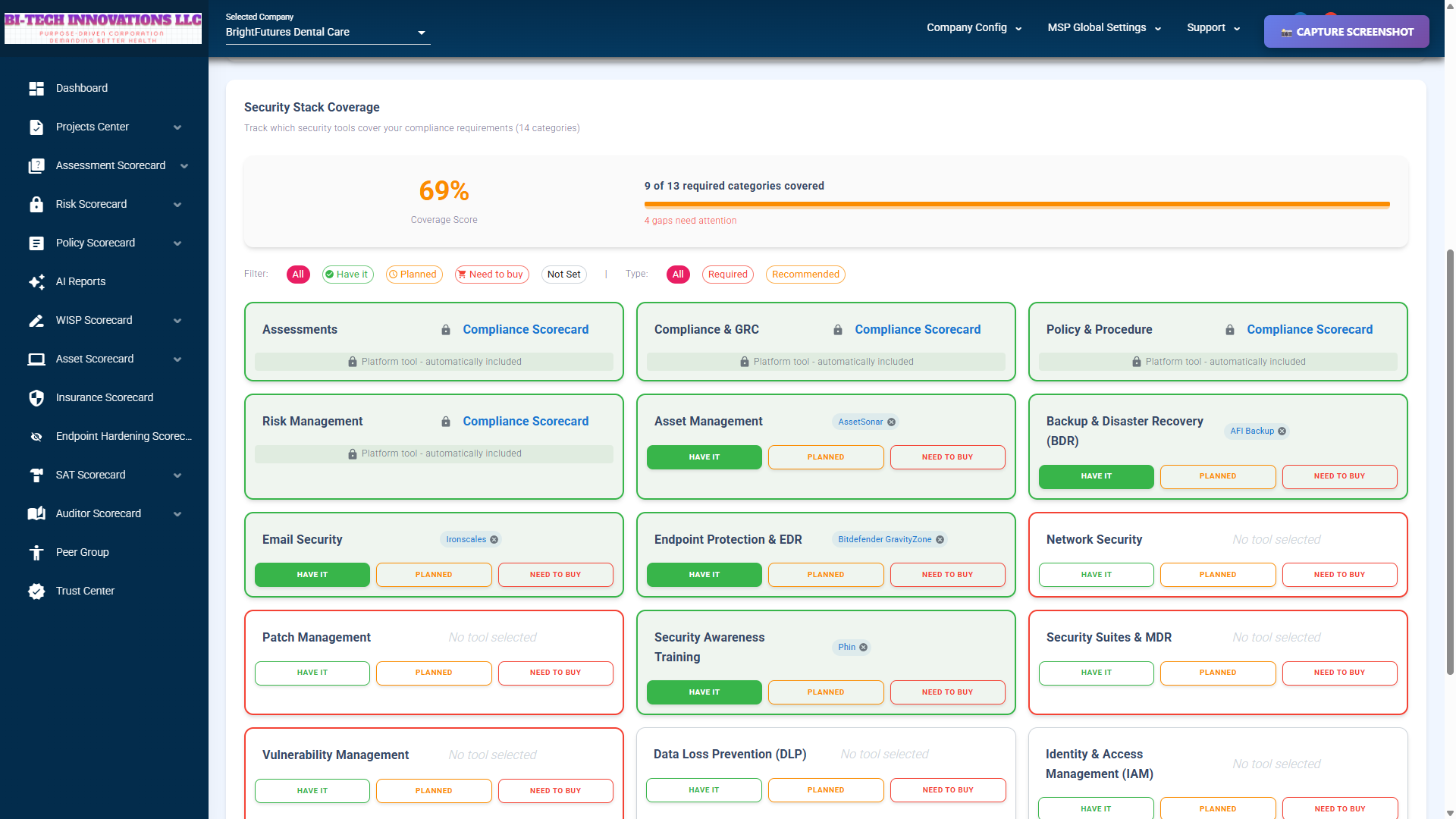
Compliance gap analysis showing security stack coverage across multiple frameworks
Compliance Scorecard generates comprehensive gap analysis reports in under 60 seconds. Here's what makes it different:
Context-Aware Gap Detection
The AI knows your deployed tools and identifies gaps based on what you have deployed, not generic checklists.
Example: You have Microsoft Defender for Endpoint, but no backup solution. The system identifies backup as a critical gap and explains exactly which NIST CSF controls are missing (PR.IP-4, PR.IP-11).
Tool Recommendations with Pricing
Every gap includes specific tool recommendations with MSP pricing:
- Veeam Backup & Replication: $1,200/year
- Rapid7 InsightVM: $800/year
- Proofpoint Email Security: $1,500/year
- Sophos XDR: $2,400/year
No more researching pricing separately. See exactly what it costs to close each gap.
Prioritized Remediation Roadmap
AI-generated implementation plan with phases, timelines, and resource estimates:
- Phase 1 (0-30 days): Critical gaps (missing backup, no MFA)
- Phase 2 (30-60 days): Recommended improvements (vulnerability scanning, SIEM)
- Phase 3 (60-90 days): Best practices (security awareness training, DLP)
Real-Time Continuous Monitoring
Track gap closure over time. Generate reports monthly or quarterly to measure progress:
Example: January gap analysis shows 65% coverage. After implementing backup and SIEM, the March gap analysis shows 85% coverage. Track improvement automatically.
Supported Frameworks
Generate gap analysis reports for 8 major compliance frameworks:
NIST Cybersecurity Framework
Requirements: 26 security tool categories
Best for: General cybersecurity compliance, risk management
Average coverage: 78% with typical MSP tool stack
CMMC Level 1 & Level 2
Requirements: 17 categories (Level 1), 20 categories (Level 2)
Best for: Defense contractors, federal supply chain
Average coverage: 65% (Level 1), 52% (Level 2)
ISO 27001
Requirements: 18 security tool categories
Best for: International compliance, ISMS certification
Average coverage: 72%
PCI-DSS
Requirements: 15 security tool categories
Best for: Payment card processing, e-commerce
Average coverage: 68%
SOC 2
Requirements: 14 security tool categories
Best for: SaaS vendors, service providers
Average coverage: 75%
HIPAA Security Rule
Requirements: 12 security tool categories
Best for: Healthcare providers, PHI protection
Average coverage: 70%
GDPR
Requirements: 10 security tool categories
Best for: EU data protection, privacy compliance
Average coverage: 80%
General Security Best Practices
Requirements: Customizable
Best for: Non-regulated industries, baseline security
Average coverage: Varies
How Gap Analysis Works (4 Steps)
Step 1: Select Framework and Client
Navigate to Dashboard → AI Reports → Gap Analysis
- Choose framework (NIST CSF, CMMC, ISO 27001, etc.)
- Select client or MSP-wide analysis
- Optional: Select existing assessment to analyze
Step 2: Configure Report Options
Customize report type and settings:
- Report type: Quick Summary, Detailed Analysis, or Executive Summary
- Include pricing: Yes/No (show MSP tool pricing)
- Risk prioritization: High-to-Low or Category-based
Step 3: Generate (30-60 Seconds)
Click "Generate Gap Analysis" and watch the progress:
- Loading tool coverage (10s)
- Mapping to framework requirements (20s)
- Generating recommendations (15s)
- Creating report (15s)
Average generation time: 42 seconds
Step 4: Review and Download
Report displays in the browser with full details:
- Executive Summary with coverage score
- Tool Coverage Matrix (visual)
- Gaps Identified (Required vs. Recommended)
- Remediation Roadmap (prioritized)
- Tool Recommendations (with pricing)
- Risk Assessment and Next Steps
Export to DOCX, PDF, or share with client via portal.
What's in a Gap Analysis Report?
Executive Summary (AI-Generated)
200-300 word overview with current state, key findings, and overall risk assessment.
Example: "Beta Healthcare currently achieves 78% compliance with NIST CSF. Analysis identified 3 high-priority gaps (Backup, SIEM, Vulnerability Management) and 5 recommended improvements. Estimated investment to close critical gaps: $4,200/year."
Tool Coverage Matrix
Visual table showing which tools you have vs. what's required:
| Category | Required | Deployed Tool | Status |
|---|---|---|---|
| EDR | Yes | Microsoft Defender | Covered |
| Backup | Yes | None | Missing |
| Email Security | Yes | Proofpoint | Covered |
Gaps Identified (AI-Narrated)
Detailed explanation of each gap with risk context:
Backup & Disaster Recovery: Client has no enterprise backup solution. NIST CSF requires backup for data protection (PR.IP-4). Risk: Data loss in a ransomware attack or hardware failure. Without backup, recovery time could exceed 72 hours, violating business continuity requirements.
Remediation Roadmap (Phased Implementation)
Step-by-step implementation plan with timelines and costs:
- Phase 1 (0-30 days): Implement Veeam Backup ($1,200/year) - Addresses PR.IP-4, PR.IP-11
- Phase 2 (30-60 days): Deploy Rapid7 InsightVM ($800/year) - Addresses ID.RA-1, DE.CM-8
- Phase 3 (60-90 days): Add SIEM (Splunk or Sentinel) - Addresses DE.AE-3, RS.AN-1
Tool Recommendations with Pricing
Specific tools to address each gap, including MSP pricing, features, pros/cons, and integration status.
Risk Assessment
Overall risk level (High/Medium/Low) with industry-specific context and regulatory considerations.
Next Steps
Immediate actions, short-term priorities, and follow-up timeline recommendations.
MSP-Scale Gap Analysis
MSPs can analyze gaps across entire client portfolios, not just within a single organization.
Portfolio-Wide Analysis
Identify common gaps across 50+ clients simultaneously:
- 42 of 50 clients are missing backup solutions
- 38 of 50 clients are missing SIEM
- 25 of 50 clients are missing vulnerability management
Result: Bulk remediation planning. Negotiate volume pricing for backup solution deployments across the entire portfolio.
Trend Analysis
Track improvement over time:
- January: 65% average coverage across portfolio
- March: 78% coverage after implementing backup and MFA
- June: 85% coverage after adding SIEM and vulnerability scanning
Show clients measurable compliance progress with data-driven reporting.
Gap Analysis vs. Competitors
Why Compliance Scorecard Gap Analysis Is Different
Most gap analysis tools identify gaps, but don't integrate with security tools for remediation. Here's what we do differently:
Tool-Aware Gap Detection
We automatically map your deployed tools to framework requirements. Competitors use generic checklists.
Example: We recognize that "Microsoft Defender for Endpoint" covers EDR requirements. We know that "Veeam Backup & Replication" addresses NIST CSF PR.IP-4. We normalize 50+ tool naming variations.
Gap-to-Tool Recommendations
Every gap includes specific tool recommendations with pricing. Competitors tell you what's missing but not how to fix it.
Example: Missing backup? We recommend Veeam ($1,200/year), Acronis ($900/year), or Datto ($1,800/year) with pros/cons for each.
Vendor Tool Integration
Gap recommendations link to the security tool catalog and procurement information. Competitors stop at identification.
60-Second Generation
Most platforms take hours or days to generate a gap analysis. Consultant engagements take 2-4 weeks. We deliver in 60 seconds.
Production Usage Statistics
Gap Analysis is in production with real MSPs generating real reports:
Usage Metrics
- 75+ MSPs using gap analysis in production
- 300+ reports generated in the last 30 days
- 42 seconds average generation time
- 4.7/5 stars average user satisfaction
- 90% of reports require minimal manual edits
Report Breakdown
Gap Analysis represents significant usage within the AI Reports feature:
- 19 gap analysis reports generated during VERSION 10 development
- Represents 54% of all AI report types (19 of 35 total reports)
- Most requested report type by MSPs
Coverage Score Distribution
- Average coverage score: 72% across all frameworks
- NIST CSF average: 78%
- CMMC Level 2 average: 52% (most challenging)
- HIPAA average: 70%
Cost Comparison: Gap Analysis ROI
Manual Gap Analysis
- Time: 2-3 days (16-24 hours)
- Cost: $1,600-$2,400 (at $100/hr internal time)
- Consistency: Varies by analyst skill
- Accuracy: Prone to human error
Consultant Gap Analysis
- Time: 2-4 weeks (including scheduling)
- Cost: $5,000-$15,000 per engagement
- Deliverable: Professional but expensive
- Scalability: Must pay per client
Compliance Scorecard Gap Analysis
- Time: 60 seconds
- Cost: $0 marginal cost (included in subscription)
- Deliverable: 10-15 page professional report
- Scalability: Unlimited reports for all clients
Time savings: 99.9% vs. manual (60 seconds vs. 16-24 hours)
Cost savings: 95-100% vs. consultant ($0 vs. $5,000-$15,000)
Quality: Same or better than manual analysis
Gap Analysis Limitations
We believe in transparency. Here's what you should know:
- Framework coverage: 8 major frameworks supported (NIST, CMMC, ISO, PCI, SOC2, HIPAA, GDPR, General). Niche or international frameworks may not be available. Workaround: Use a "general" framework and customize MSP requirements.
- Tool catalog coverage: 40+ tools in the catalog, but not exhaustive. Niche or very new tools may not be included. Workaround: Add custom tools to MSP tool selections.
- Pricing estimates: MSP pricing from vendortool API updated weekly. Enterprise pricing and volume discounts are not reflected. Disclaimer: "Pricing estimates, confirm with vendor."
- Manual review recommended: AI-generated reports are highly accurate, but expert review is recommended before client delivery.
- No multi-framework comparison: Can analyze one framework at a time. Cannot compare "NIST vs. ISO" coverage side-by-side (roadmap Q3 2026).
Who Benefits from Gap Analysis?
MSPs Managing 50+ Clients
Identify common gaps across the entire portfolio. Bulk remediation planning. Track compliance improvement at scale.
Defense Contractors (CMMC Compliance)
Generate CMMC Level 1 and Level 2 gap analysis reports. Identify missing controls before third-party assessment.
Healthcare Organizations (HIPAA)
Ensure all HIPAA Security Rule technical safeguards are covered. Identify gaps in PHI protection.
Auditors and Compliance Consultants
Accelerate client assessments from days to minutes. Professional deliverables without manual research.
Get Started with Gap Analysis
Gap Analysis is included with v10 at no additional cost. Generate unlimited reports for all clients.
Questions? Read the FAQ or contact our team.