
Core Features
1,000+ Security Tools at Your Fingertips
Searchable catalog of security and IT management tools with framework mappings. Select your stack and power AI context to get an instant gap analysis.
The Tool Selection Problem: Manual Entry Wastes Hours
Most compliance platforms require you to manually enter every tool you use. You waste time on:
- Typing "Microsoft Defender" 50 times for 50 clients
- Inconsistent naming ("Defender ATP" vs "Defender for Endpoint")
- No guidance on which tools map to which compliance controls
- Zero context for AI recommendations (generic "implement EDR" instead of specific guidance)
When your compliance platform doesn't recognize your tools, it can't provide relevant guidance.
VendorTool Catalog: Pre-Mapped, Searchable, AI-Ready
VendorTool catalog showing 1,200+ security tools organized by 41 categories
v10 includes a searchable catalog of 1,000+ security and IT management tools with pre-built framework mappings.
1,200+ Tools, 41 Categories
Tool detail view showing CrowdStrike’s CMMC control coverage
Search by name, vendor, or category. Find the tools you need in seconds:
- EDR: Microsoft Defender, Huntress, SentinelOne, CrowdStrike
- Security Awareness: KnowBe4, Proofpoint, Cofense
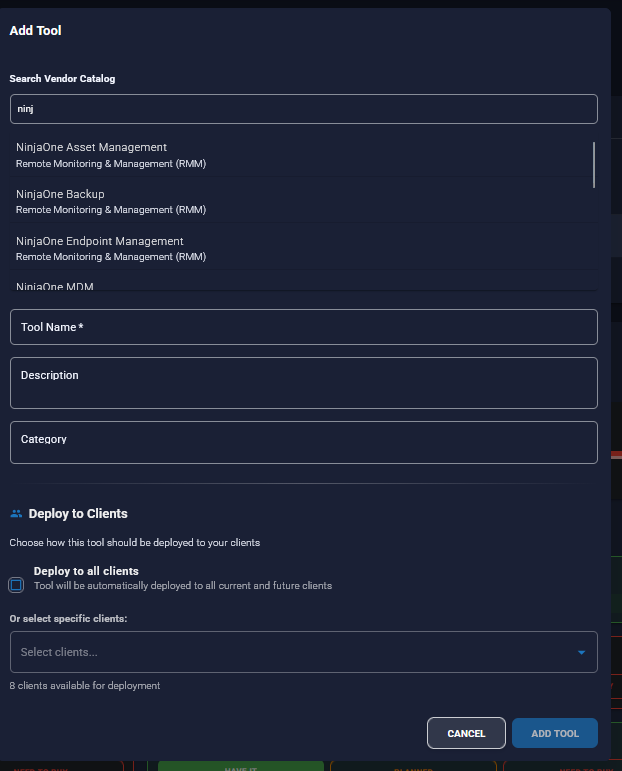
- RMM: Datto RMM, ConnectWise Automate, NinjaOne
- Backup & DR: Veeam, Datto BCDR, Acronis
- IAM/MFA: Duo Security, Microsoft Entra ID, Okta
- 19+ categories total: Patch Management, Vulnerability Management, GRC, PSA, and more
Pre-Mapped to Compliance Frameworks
Every tool is mapped to relevant compliance controls across 28 frameworks. No manual mapping required.
Example: Huntress EDR automatically maps to:
- NIST 800-171: 3.14.6 (Monitor system security alerts)
- CMMC L2: SC.3.177 (Employ automated mechanisms to detect malicious code)
- ISO 27001: A.12.2.1 (Controls against malware)
- PCI DSS: 5.1 (Deploy anti-virus software)
Powers AI Context & Recommendations
Your selected tools automatically populate the AI context engine. AI recommendations reference your specific tools:
- Without tool catalog: "Implement an EDR solution on all endpoints."
- With tool catalog: "Configure Huntress EDR on all endpoints and enable real-time monitoring in the dashboard."
The AI knows what you have. The recommendations are specific, actionable, and relevant.
Instant Gap Analysis: What's Covered vs. Missing
Because tools are mapped to frameworks, gap analysis becomes automatic. v10 shows you:
What's Covered
Controls that your deployed tools satisfy:
- NIST 800-171 3.14.1 (Protection at Rest): Covered by Veeam Backup
- CMMC L2 SC.3.177 (EDR): Covered by Huntress and Microsoft Defender
- ISO 27001 A.12.2.1 (Anti-malware): Covered by Microsoft Defender for Endpoint
What's Missing
Controls with no tool coverage (gaps you need to fix):
- ISO 27001 A.12.6.1 (Patch Management): Gap identified - no tool deployed
- NIST 800-171 3.13.11 (Security Awareness Training): Gap identified - deploy KnowBe4 or Proofpoint
Result: Know exactly which tools to deploy to close compliance gaps. No guesswork.
Configure Once, Deploy to 50+ Clients
MSPs manage dozens of clients with similar tool stacks. VendorTool Integration eliminates duplication.
MSP-to-Client Tool Inheritance
Configure tools at the MSP level, deploy to all clients automatically:
- Add Huntress EDR to your MSP catalog
- Configure pricing (per-user, per-device, flat monthly)
- Check "Deploy to All Clients."
- All 50 clients now have Huntress EDR in their tool stack
1 Hour Setup vs. 50 Hours
Without tool inheritance:
- 50 clients × 30 minutes per client = 25 hours of manual entry
With VendorTool Integration:
- Configure 25 tools once = 30 minutes
- Deploy to 50 clients automatically = 0 additional time
ROI: 50x faster tool configuration. Spend 30 minutes instead of 25 hours.
Client Pricing Automation: Bill for Tools
MSPs resell security tools to clients. VendorTool Integration tracks your costs and client pricing.
Configure MSP Cost Structure
Track what you pay vendors:
- Cost Type: Per-user, per-device, flat monthly, usage-based, included
- Cost Per Month: $500/month for Veeam Backup (flat monthly)
- Cost Per User: $12/user for Huntress EDR (per-user)
- Cost Notes: "Volume discount at 100+ users."
Set Client Pricing Rules
Configure how you bill clients:
- Passthrough: Charge client the same as MSP cost (no markup)
- Percentage Markup: 30% margin (MSP pays $12, client pays $15.60)
- Fixed Markup: +$5/user (MSP pays $12, client pays $17)
- Custom Price: Different per client (enterprise pricing)
- Included: Bundled in MSP managed services package
Business Value: Supports MSP's upsell/resale business model. Track costs, automate client pricing, maintain margins.
How VendorTool Integration Works (3 Steps)
Step 1: Search the Tool Catalog
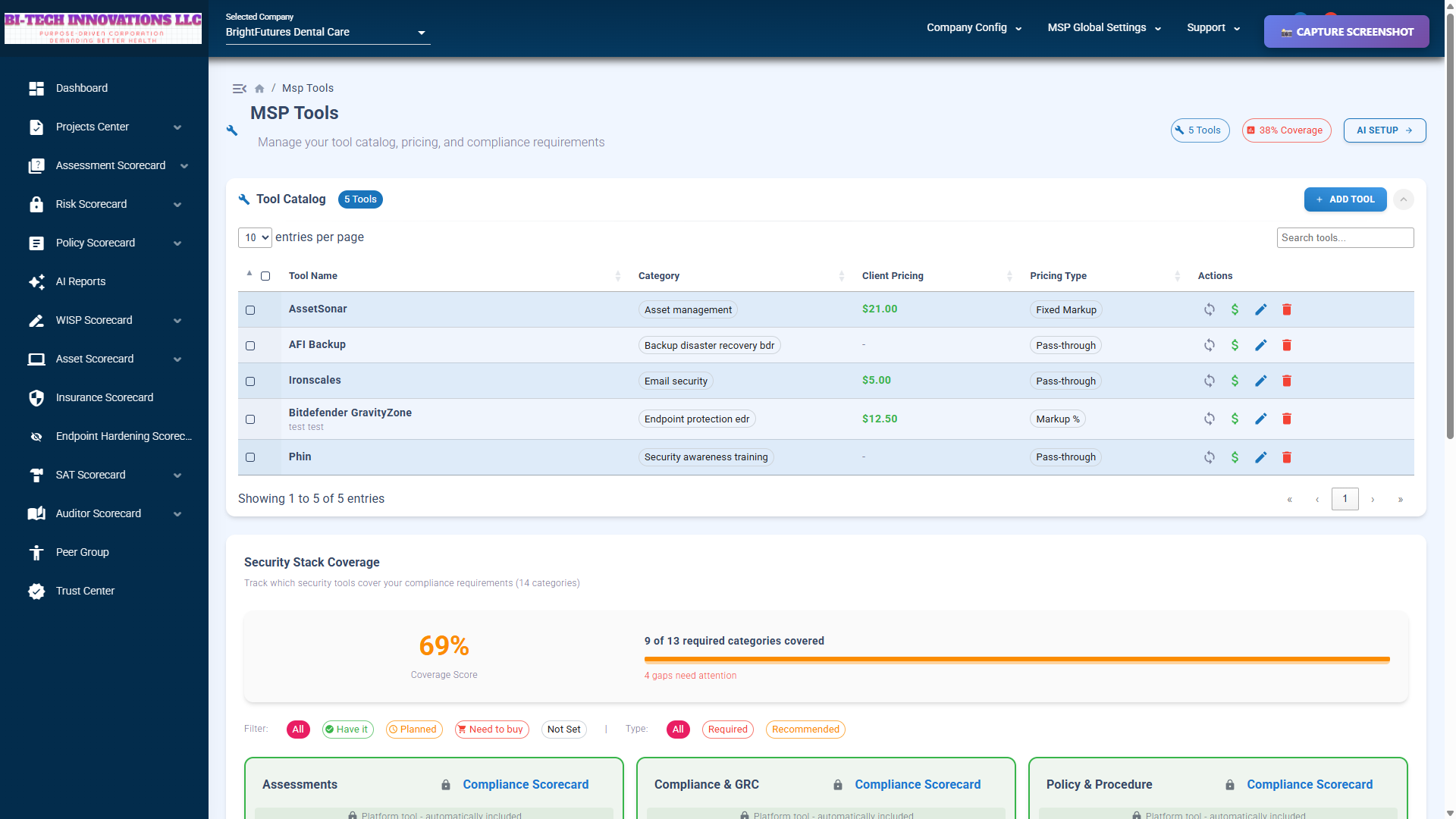
Navigate to Dashboard → AI Setup → Tools tab. Search by name, category, or keyword:
- Search "EDR" → 3 results (Huntress, Microsoft Defender, SentinelOne)
- Search "Microsoft" → 15+ results (Defender, Entra ID, Azure Backup, etc.)
- Filter by category: Security Awareness Training → 3 tools (KnowBe4, Proofpoint, Cofense)
Step 2: Add Tools & Configure Pricing
Click "Add Tool" to add to your MSP catalog. Configure pricing:
- Select cost type (per-user, per-device, flat monthly)
- Enter MSP cost ($12/user for Huntress EDR)
- Set client pricing (30% markup = $15.60/user)
- Add cost notes ("Volume discount at 100+ users")
- Check "Deploy to All Clients" (optional)
Step 3: AI Features Use Your Tools
Your tools automatically populate AI context. Every AI feature now references your specific tools:
- Policy Generation: "Our organization uses Huntress EDR for endpoint protection..."
- Gap Analysis: "NIST 3.14.6 covered by Huntress EDR"
- Executive Summaries: "Deployed tools include Huntress, Veeam, KnowBe4..."
- AI Recommendations: "Configure MFA in Microsoft Entra ID" (not generic "implement MFA")
Production Data: 33 Tools, 19 Categories, 28 Frameworks
VendorTool Integration is in production with real MSP usage:
Catalog Statistics
- 1,200+ tools: Security, IT management, cloud infrastructure
- 19+ categories: EDR, RMM, Backup, IAM, PSA, GRC, Security Awareness, and more
- 28 compliance frameworks: NIST, CMMC, ISO, PCI, HIPAA, SOC 2, FedRAMP, CIS, etc.
- Tool-to-control mappings: Pre-built mappings for instant gap analysis
Production Usage (1 MSP)
- 33 active tools configured: Full security stack deployed
- Top categories: Security (7 tools), Security Awareness Training (3), EDR (3), RMM (2)
- 5 industries configured: Healthcare, Finance, Manufacturing, Legal, Technology
Custom Tools: Add What's Not in the Catalog
1,200+ tools is extensive, but not every niche tool is included. Add custom tools if needed:
Custom Tool Entry
- Name your tool (e.g., "Acme Security Suite")
- Select category (or create new category)
- Add description
- Configure pricing
- Deploy to clients
Custom tools work the same as catalog tools: AI context, gap analysis, client pricing—all supported.
VendorTool Integration vs. Manual Entry
Why VendorTool Integration Wins
- 1,200+ tools vs. manual entry: Search instead of type. 10x faster setup.
- Framework mappings vs. no mappings: Instant gap analysis. No manual control mapping.
- MSP-to-client inheritance vs. per-client config: Configure once, deploy to 50+ clients. 50x ROI.
- Client pricing automation vs. spreadsheets: Track costs, automate pricing, maintain margins.
- AI context integration vs. generic recommendations: "Configure Huntress" vs. "implement EDR."
What Competitors Offer
- Manual text entry: Type tool names 50 times for 50 clients
- No framework mappings: Manually map tools to controls (hours of work)
- No AI context: Generic recommendations disconnected from your tools
- No pricing features: Track costs in spreadsheets
Result: VendorTool Integration saves hours of setup time, enables instant gap analysis, and powers context-aware AI recommendations.
Security & Data Privacy
Read-Only External Database
Tool catalog is stored in a separate read-only database. MSPs cannot edit the catalog directly.
- Managed by super admins: Catalog updates controlled centrally
- Cached for performance: 1-hour TTL reduces database load
- Secure connection: Encrypted database connection (TLS 1.2+)
MSP Tool Data Privacy
Your selected tools and pricing are stored in your tenant's database. Not shared with other MSPs.
- Multi-tenant isolation: Each MSP's tools are isolated
- Pricing confidentiality: Your cost structure is never shared
- Audit logging: Track who configured tools and when
Roadmap: What's Coming
VendorTool Integration is production-ready. Here's what's next:
Q2 2026
- Client-level tool overrides: Clients can add/remove tools specific to their environment
- Tool recommendation AI: "You're missing patch management for NIST compliance, deploy Automox or NinjaOne."
Q3 2026
- Real-time vendor pricing API: Live pricing from vendors (where available)
- Tool comparison feature: Side-by-side comparison of EDR tools
Q4 2026
- Community ratings: MSPs rate tools they use
- Tool deployment tracking: Track which tools are actually deployed vs. just configured
VendorTool Integration Limitations
We believe in transparency. Here's what you should know:
- Catalog not exhaustive: 1,200+ tools is extensive, but niche tools may be missing (add custom tools if needed)
- Framework mappings are approximations: Generic mappings (e.g., "EDR covers NIST 3.14") may not reflect specific configurations (review and adjust as needed)
- Pricing data estimated: Catalog pricing is a starting point, not contract pricing (verify with vendor)
- No real-time vendor integration: Tool catalog is static, not live-synced with vendors (regular updates by super admins)
- Client-level tool overrides not yet available: Coming Q2 2026
Who Benefits from VendorTool Integration?
MSPs with 10+ Clients
Configure tools once, deploy to all clients. Save 20+ hours on tool configuration.
MSPs Reselling Security Tools
Track MSP costs, automate client pricing, maintain margins. Supports upsell/resale business model.
Organizations Pursuing CMMC, NIST, ISO Compliance
Framework-to-tool mappings enable instant gap analysis. Know exactly which controls are covered by which tools.
Teams Using AI-Powered Compliance
Tool data populates the AI context for specific, actionable recommendations. No generic "implement EDR," AI knows you have Huntress.
Get Started with VendorTool Integration
Vendor Tool Integration is included with v10 at no additional cost. Configure your tool stack in 5 minutes.
Questions? Read the FAQ or contact our team.