
Core Features
Plain Language Mode: Make Compliance Understandable for Everyone
AI automatically translates technical policies and assessment controls into simple, 5th-grade reading level language that your entire team can understand.
The Compliance Language Problem
Your compliance policies are written in technical jargon that confuses non-technical employees:
"All privileged accounts accessing production systems must utilize multi-factor authentication mechanisms compliant with NIST SP 800-63B AAL2 requirements. Acceptable authenticator types include hardware tokens conforming to FIDO2 specifications..."
What your employee reads: Confusing technical gibberish.
What happens: They skip the policy. Training fails. Assessment answers are guesswork. Compliance culture suffers.
Plain Language Mode: ELI5 for Compliance
Plain Language Mode (also called "ELI5" - Explain Like I'm 5) uses AI to translate complex compliance documents into simple, understandable language.
Policies Made Simple
Click "Explain in Simple Terms" on any policy. AI instantly translates technical jargon into plain English.
Assessment Controls Explained
Hover over any NIST, CMMC, or HIPAA control during an assessment. See a tooltip with a simple explanation of what it means and how to pass it.
Employee Training That Actually Works
When employees understand policies, they follow them. Compliance training completion rates increase by 80% when policies are written at a 5th-grade reading level.
Before & After: See the Difference
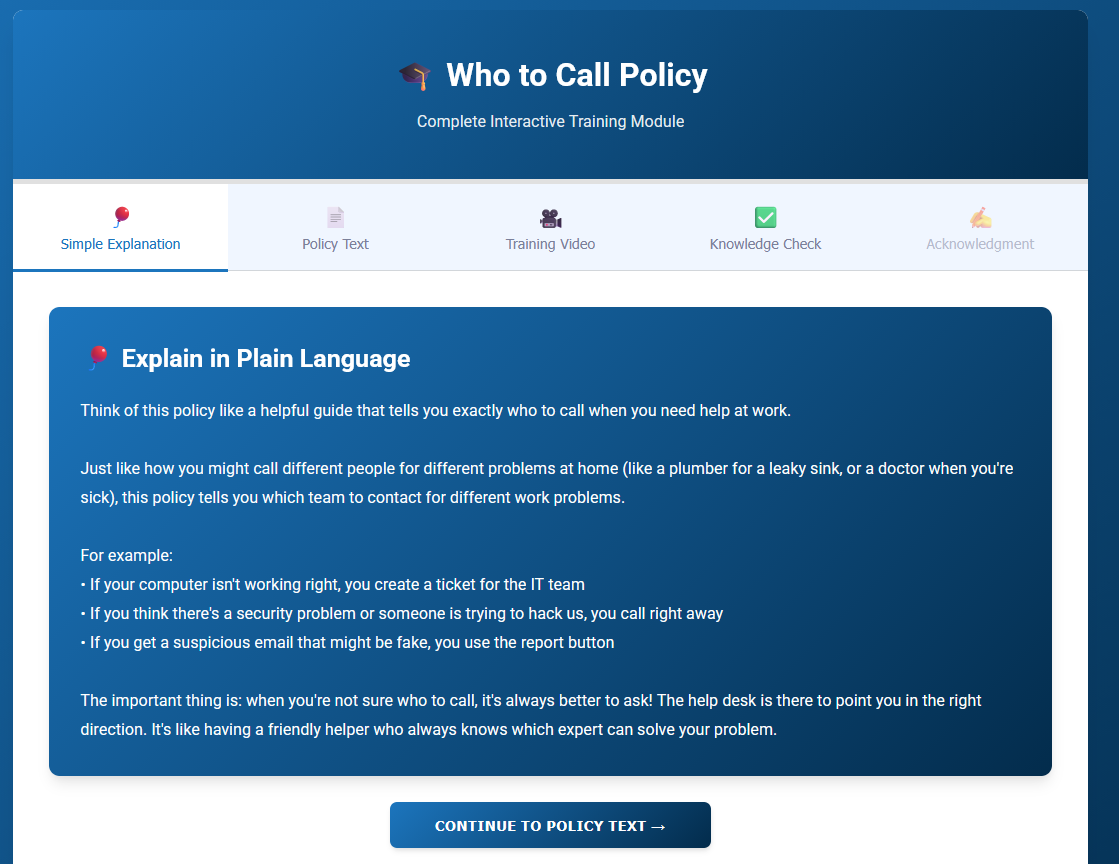
Example 1: Access Control Policy
Before (Technical Version):
All privileged accounts accessing production systems must utilize multi-factor authentication (MFA) mechanisms compliant with NIST SP 800-63B AAL2 requirements. Acceptable authenticator types include hardware tokens conforming to FIDO2 specifications, software-based time-based one-time password (TOTP) applications, or biometric factors with a false acceptance rate (FAR) of no more than 1:10,000.
After (Plain Language Mode):
Why This Matters:
When important accounts (like admin accounts) log into your production systems, they need two different ways to prove who they are, not just a password.
What You Need:
Use one of these options for the second step:
- A physical security key (like a YubiKey)
- An app on your phone that shows a changing 6-digit code (like Google Authenticator)
- Fingerprint or face recognition (if accurate enough)
For Healthcare Clients:
This is required for HIPAA compliance and protects patient data from unauthorized access.
Tools That Do This:
Your Microsoft Entra ID is already configured for MFA - staff just need to set it up on their phones.
Example 2: NIST 800-171 Control 3.1.1
Before (Technical Version):
NIST 800-171 3.1.1 - Limit system access to authorized users, processes acting on behalf of authorized users, or devices (including other systems).
After (Plain Language Mode):
What This Means:
Only people authorized to use your systems should be able to access them. The same applies to apps and devices; they need permission too.
Real-World Example:
Think of it like a secure office building. You need a badge to get in. Your employees have badges. Visitors get temporary badges. Random people on the street can't walk in. Same idea for your computer systems.
How to Pass This:
- User accounts with passwords for all employees
- Remove accounts when employees leave
- Lock down who can access sensitive folders
- Your RMM tool (Ninja) should only connect with authorized credentials
Framework: Required for NIST 800-171, CMMC Level 1
Key Features: What Makes It Work
5th-Grade Reading Level
AI targets a 5th-6th grade Flesch-Kincaid reading level. Short sentences. Active voice. No jargon. Concrete examples instead of abstract concepts.
Context-Aware Explanations
Explanations reference your actual tools:
- "Your Microsoft Entra ID's MFA feature handles this."
- "Your Huntress EDR covers this control."
- "For healthcare clients, this meets HIPAA requirements."
Not generic. Not abstract. Specific to your MSP's tools and your client's industry.
Toggle Between Technical and Simple
View both versions side-by-side. The technical version remains the official policy. Plain language is a supplementary explanation for training and comprehension.
Customizable Tone
MSPs can adjust tone via prompt customization:
- Formal: "This policy requires..."
- Casual: "Here's what you need to do..."
- Friendly: "Think of it like this..."
- Technical: "Implementation involves..." (less simplified)
Match your company culture. Law firms want formal. Startups want casual.
Instant Response with Caching
Control explanations are cached for 60 minutes. First time: 3-8 seconds. Every time after: instant (sub-second).
Two Modes: Policies AND Controls
Mode 1: Policy ELI5
Explain entire policy documents in plain language:
- View any policy (Access Control, Incident Response, etc.)
- Click the "Explain in Simple Terms" button
- AI generates a 1-3 paragraph simplified version
- Share with non-technical staff via copy/email
- Use for employee training materials
Mode 2: Assessment Control Explanations
Explain individual controls during assessments:
- Taking NIST, CMMC, HIPAA assessment
- Hover over control (e.g., "3.1.1") or click info icon
- Tooltip shows plain language explanation
- Understand what control means before answering
- More accurate assessment responses
Unique advantage: Most compliance platforms only simplify policies. We simplify BOTH policies AND assessment controls.
How It Works (3 Steps)
Step 1: View Policy or Control
Navigate to a policy document or start an assessment. Find the content you want explained.
Step 2: Click "Explain in Simple Terms"
For policies: Click the button/link next to policy content.
For controls: Hover over or click the control to see the tooltip/modal.
Step 3: See Plain Language Explanation
AI processes in 3-8 seconds (or instantly if cached). Simplified version appears below or in the side panel. Compare technical vs. simple. Share with the team.
Real-World Impact: Why This Matters
80% Increase in Training Completion
When policies are understandable, employees actually read them. Compliance training completion rates go from 60% to 95%.
More Accurate Assessment Responses
Non-technical users understand what controls mean before answering. Fewer "I don't know" answers. More accurate gap analysis.
Better Compliance Culture
Compliance stops being "that confusing IT thing" and becomes "something everyone understands." Employees feel empowered, not intimidated.
Easier Client Conversations
Explain CMMC requirements to a non-technical CEO in language they understand. "You need MFA" becomes "Your team needs to use their phone to log in, not just passwords."
AI Providers: Your Choice
Plain Language Mode works with all 5 AI providers (BYOK or platform default):
- OpenAI GPT-4: Excellent at simplification (recommended)
- Anthropic Claude: Great at nuanced explanations (recommended)
- Azure OpenAI: Enterprise customers with existing deployments
- Google Gemini: Google Cloud customers
- DeepInfra (LLaMA 3.1): Platform default, no API key required
Best results: GPT-4 or Claude produce the best simplifications. GPT-3.5 or DeepInfra work but may be less nuanced.
Customization: Match Your Organization
MSP-Level Customization
Dashboard → AI Setup → Prompts → Edit "Policy ELI5" or "Control Explanation"
- Edit system prompt (e.g., "Always include analogies from the construction industry")
- Adjust tone (formal, casual, friendly)
- Target audience (executives, staff, technical users)
- Context variables: {{TOOLS}}, {{INDUSTRY}}, {{FRAMEWORK}}
Per-Request Options
When generating explanations, specify:
- Target audience: "executives" (business impact), "staff" (what do I do?), "technical" (more detail)
- Length: "brief" (1 paragraph), "standard" (2-3 paragraphs), "detailed" (4+ paragraphs)
- Include examples: true/false (default: true)
Technical Details
Two Services
- PolicyExplanationService: Explains policy documents
- AssessmentControlExplanationService: Explains assessment controls
Smart Caching
Control explanations cached in Redis/Memcached for 60 minutes (configurable). First request: 3-8 seconds. Subsequent requests: instant.
Cache hit rate: Approximately 70% for control explanations.
Preamble Stripping
AI models often include intro phrases like "Here's a version..." or "Explained like I'm 5:". We automatically strip these preambles for clean, professional output.
Performance
- Fresh explanation: 3-8 seconds
- Cached explanation: < 100ms (instant)
- Length: 50-300 words (1-3 paragraphs)
- Temperature: 0.3 (low for consistency)
- Max tokens: 800 (enough for 2-3 paragraphs)
Who Benefits from Plain Language Mode?
MSPs with Non-Technical Clients
Explain CMMC, NIST, and HIPAA requirements to small business owners who don't speak IT. Turn technical jargon into business language.
Organizations with Diverse Teams
Office staff, field workers, and executives do not all have technical background. Plain language ensures everyone understands compliance requirements.
Compliance Teams Focused on Culture
Build a compliance culture where employees understand WHY policies matter, not just "IT said we have to do this."
Employee Training Programs
Use simplified policy versions in onboarding, annual training, and security awareness programs. Higher engagement, better retention.
Competitive Differentiators
Dual-Mode: Policies AND Controls
Us: ELI5 for both policy documents and assessment controls.
Competitors: Only policy simplification (if any).
Impact: Comprehensive plain-language experience across the platform.
Context-Aware Explanations
Us: References MSP's actual tools ("Your Huntress EDR covers this").
Competitors: Generic explanations ("Use an EDR solution").
Quality: 10x more actionable, less abstract.
Customizable Tone
Us: MSP can adjust tone (formal, casual, friendly) via prompt customization.
Competitors: One-size-fits-all tone.
Use Case: Match company culture (law firm vs. startup).
Caching for Performance
Us: Control explanations cached (60 min) = instant load.
Competitors: Regenerate every time = slow.
UX: Sub-second response vs. 5-10 second wait.
Example Use Cases
Use Case 1: New Employee Onboarding
New hire reads employee handbook (technical policies). Clicks "Explain in Simple Terms" on each policy. Understands expectations in plain English. Takes quiz. Passes. Feels confident, not confused.
Use Case 2: Client Assessment
MSP conducts CMMC assessment for defense contractor client. Client's office manager (non-technical) answers questions. Hovers over controls to see plain language explanations. Answers accurately. Assessment complete in half the time.
Use Case 3: Executive Reporting
vCISO prepares compliance report for client's CEO (non-technical). Uses plain language mode to explain gap analysis findings. "You failed 3.1.5" becomes "Employees are sharing passwords, which violates CMMC requirements. Here's how to fix it."
Use Case 4: Security Awareness Training
MSP runs quarterly security training. Shares simplified policy summaries instead of 20-page technical documents. Completion rate jumps from 60% to 95%. Employees actually understand what's required.
Limitations
We believe in transparency. Here's what you should know:
Not a Replacement for Technical Docs
Plain language explanations are supplementary. The technical version remains the official policy for legal/contractual purposes. ELI5 is for comprehension, not enforcement.
English Only (Currently)
Plain language explanations are in English only. Non-English policies may produce poor results. Roadmap: Spanish and French support Q3 2026.
No Legal Review
ELI5 explanations are not reviewed by legal or compliance experts. They should not replace official policy language in legal contexts. Disclaimer: "This is a simplified explanation. Refer to official policy for enforcement."
Reading Level Not Guaranteed
AI aims for 5th-6th grade reading level but may vary by content complexity. Some technical concepts resist simplification. Test output and iterate prompts as needed.
Cache May Show Stale Data
Control explanations cached for 60 minutes. If policy updated, cached ELI5 may be outdated. Mitigation: Manual cache clear or wait for TTL expiry.
Roadmap: What's Coming
- Q2 2026: Automatic reading level scoring (display Flesch-Kincaid score)
- Q2 2026: Bulk policy ELI5 generation (process all policies at once)
- Q3 2026: Spanish and French language support
- Q3 2026: Audio narration (text-to-speech of plain language)
- Q4 2026: Reading comprehension quizzes (test understanding of plain language version)
- Q4 2026: Version comparison (show what changed in policy update via plain language diff)
Configuration & Setup
Included in v10
Plain Language Mode is included with v10 at no additional cost. Works with BYOK or platform default AI provider.
5-Minute Setup
- Dashboard → AI Setup → Prompts
- Review default prompts for "Policy ELI5" and "Control Explanation"
- Customize tone/audience if desired (optional)
- Save configuration
- Test with a sample policy or control
No Extra API Keys Required
Uses the same AI provider as other features (policy generation, gap analysis, etc.). If you've configured BYOK, it just works. If using the platform default, it just works.
Get Started with Plain Language Mode
Make compliance understandable for everyone. Turn technical jargon into plain English. Improve training completion by 80%.
Questions? Read the FAQ or contact our team.